This guide is aimed at helping support and engineering debug problems with Reconfigurator. If you run into a problem that’s not covered here, consider adding it!
This guide is not aimed at end users (customers). See the product documentation for the customer view.
If you are debugging a Reconfigurator problem right now, start with the Reconfigurator debugging decision tree.
Prerequisites
Reconfigurator is a subsystem in Nexus (the guts of the control plane) that’s responsible for changes to the control plane topology and configuration. This primarily includes:
add/expunge physical disks
add/expunge sleds
system update (includes all updateable software in the system, including service processor software, host OS, control plane, database schema, etc.)
Reconfigurator uses the "plan-execute pattern" plus the reconciler pattern. It basically looks like this:
Blueprints are detailed descriptions of all the commissioned hardware and software in the system, their versions, and their configurations.
There may be multiple blueprints in the system at once, but at any given time, only one is the current target blueprint. This is the one the system is working to make reality.
The system periodically queries all components to collect inventory. This is the ground truth about what components exist, their configuration, their version, basic health, etc.
The planner examines the latest blueprint and inventory collection and constructs a new blueprint that may modify the system in some way (e.g., to update the configuration or version of some component or deploy a new component). If the new blueprint is different from the previous one, the planner will attempt to make it the new target.
The current target blueprint is continually being executed, meaning that the system is attempting to make the real configuration of the system match the blueprint.
Additionally:
Blueprints are stored in the control plane database (CockroachDB).
The current target blueprint is stored in the control plane database.
All (three) Nexus instances are continually running all these processes:
inventory collection
blueprint planning
blueprint execution
as well as various other processes involved in managing the system.
All of these are implementation details of the system. End users are not expected to have to know about, understand, operate, or debug any of this. Almost none of this is exposed via the external API.
omdb (run from the switch zone of either Scrimlet) is the primary tool for support and engineering to observe and control Reconfigurator.
For more, see:
What to expect during a normal software update
Customer view
Customers start a software update by:
Using the console, CLI, or API to upload a TUF repository (ZIP file) containing all of new system software; then
Setting the system’s target release to new TUF repository.
The system then asynchronously updates all the software and eventually reports that all software is running the new release. At that point, from the customer’s perspective, the software update is done.
The external API provides very basic progress information in the form of the number of components running at each software version. End users (customers) do not have any deeper visibility into what’s going on during the update (because communicating more would require customers to understand implementation details of the control plane that they shouldn’t need to know to operate the system).
Update sequence
Broadly, the update proceeds in phases:
"MGS-driven updates" for all sleds, switches, and power shelf controllers (PSCs):[1]
Root of trust (RoT) bootloader
Root of trust (RoT) software (Hubris image)
Service processor (SP) software (Hubris image)
Host OS (sleds only; includes sled agent and switch zone services), divided into phase 1 and phase 2. Both are updated in the same step.
For a given sled, switch, or PSC, these components are updated in that order.
Only one of these MGS-driven updates may be pending for the whole system (not just one sled) at one time. (This is subject to change.)
There is no particular order in which the sleds themselves get updated. The system may even bounce around between sleds, starting an RoT bootloader update on a sled before having done the host OS update of the previous sled.
All control plane zones except for Nexus. These zone updates happen in arbitrary order. The system may bounce around between components and sleds.
1 NTP zone per sled.
1 Crucible zone per physical disk (10 per sled).
Fixed number of most other kinds zone. Examples:
5 CockroachDB zones
3 internal DNS zones
5 external DNS zones (varies by deployment, configured at rack setup time)
3 Crucible pantry zones
etc.
Nexus handoff
Deploy new Nexus instances
Disable creation of new sagas
Drain all currently running sagas
Disable database access
Hand off control from old Nexus instances to new Nexus instances
Database schema migration
Old Nexus instances expunged
The top-level items in this list are strictly sequential. Control plane zone updates do not start until all MGS-driven updates are complete. Nexus handoff does not start until all other control plane zones are completed.
MGS updates (e.g., SP updates) may be skipped if the new target release specifies the same versions for these components that are already deployed. This is common in development/test environments, though unexpected in customer environments. All releases, even development ones, have new versions of the host OS and control plane zones so these are never skipped.
Verifying that the system is ready to be updated
Before an update, we expect the response of the system update status endpoint to return contact_support: false. If viewing only through the console, there should be no warning asking the user to contact support. See Task: Check for contact_support flag.
Should the contact_support field be true, see Task: Checking why the contact support field in system update status is true.
Verifying that everything is working okay during the update
During an update, we expect:
new blueprints to be created and made the target every few minutes (at most)
the number of components at the new version should be increasing
the number of components at the old version should be decreasing
These are observable in the web console ("time last step planned" and progress) and external API.
With omdb, you can watch omdb reconfigurator history for blueprint creation and omdb nexus update-status to see the counts of components at each version.
It’s possible to observe transient errors internally (including with omdb) while the upgrade is ongoing. These will generally show up as connection errors, request timeouts, or HTTP 503 ("Service Unavailable") errors.
Verifying that everything is working okay after the update
After the update:
no new blueprints should be created
all components should be at the new version
a few minutes after the update is finished, check the system update status endpoint, or the console view of "System Update" to see if the response is telling the user they should call support. See Task: Check for contact_support flag. If contact support is true see Task: Checking why the contact support field in system update status is true.
See the previous sections for how to observe these.
Stepping through the update
Generally, the system only takes one step a time (e.g., updating one zone). By "taking a step", we usually mean that the system:
creates a new blueprint that differs from the parent only in specifying this one change
makes that the target blueprint
executes that blueprint
waits for inventory to reflect the change
You can thus observe these steps by looking at the blueprint history. See Task: Checking recent Reconfigurator activity.
Types of update steps
MGS-driven updates
MGS-driven updates look like this in omdb reconfigurator history:
...
34224 2025-11-01T00:01:19.864Z cc06b05c-bac4-48b6-ba42-bbfe123a9bd0  enabled: update Power 0 (BRM45220004) SP to 1.0.49
34225 2025-11-01T00:02:07.908Z c144c2cd-449f-4046-9c5a-1762a160fd5f  enabled: update Switch 1 (BRM44220008) SP to 1.0.49
34226 2025-11-01T00:03:00.189Z 7b9c395d-1a46-47e5-a794-ea099e0073ea  enabled: update Switch 0 (BRM44220012) SP to 1.0.49
34227 2025-11-01T00:03:40.756Z 8e2f7f7a-347c-4f28-92ec-ca36988f09bf  enabled: update Sled 7 (BRM27230045) SP to 1.0.49
34228 2025-11-01T00:05:47.394Z 1b296f96-2425-41f8-ba69-a41272e84f06  enabled: update Sled 11 (BRM42220006) SP to 1.0.49
34229 2025-11-01T00:10:11.242Z 76ab7fbb-0765-4f0a-8bd6-9181188ceaa9  enabled: update Sled 10 (BRM42220009) SP to 1.0.49
34230 2025-11-01T00:13:06.479Z 0ea61584-ffd4-414a-b47a-56307a05e2df  enabled: update Sled 7 (BRM27230045) host phase 1 to 17.0.0-0.ci+git495eab19cfc
34231 2025-11-01T00:21:01.711Z 1c996ce0-b329-4903-b086-660488167f88  enabled: update Sled 11 (BRM42220006) host phase 1 to 17.0.0-0.ci+git495eab19cfc
34232 2025-11-01T00:30:53.689Z e79f5524-b36b-4a2b-8f89-44680be0feea  enabled: update Sled 10 (BRM42220009) host phase 1 to 17.0.0-0.ci+git495eab19cfc
34233 2025-11-01T00:40:55.865Z 51c56523-c0ce-4c81-91dd-d9aa9c3cc161  enabled: update Sled 23 (BRM42220016) SP to 1.0.49
34234 2025-11-01T00:42:49.677Z 4e22c3f4-6246-43fa-9f45-4b1bbb572161  enabled: update Sled 16 (BRM42220014) SP to 1.0.49
34235 2025-11-01T00:46:49.181Z adb11f21-5717-4055-85e3-86b7c92192cf  enabled: update Sled 23 (BRM42220016) host phase 1 to 17.0.0-0.ci+git495eab19cfc
34236 2025-11-01T00:55:32.856Z 74129e2f-5372-4637-bb3d-3917a1ca76c3  enabled: update Sled 16 (BRM42220014) host phase 1 to 17.0.0-0.ci+git495eab19cfc
...As mentioned above, the system bounces around between sleds, but SPs are always updated before the host OS for a given sled.
Non-Nexus zone updates
Non-Nexus zone updates come in one of two flavors: in-place updates and add/expunge updates.
Crucible, ClickhouseKeeper, and CockroachDB are examples of components whose zones are updated in-place. This means that their software image is changed while their local persistent storage is preserved. It looks like this in omdb reconfigurator history:
...
34252 2025-11-01T02:29:28.773Z bb07cd71-d11a-4182-8817-2970b25df4d8  enabled: updating Crucible zone 167cf6a2-ec51-4de2-bc6c-7785bbc0e436 in-place
...
34258 2025-11-01T02:32:11.003Z af0f096a-95a6-4969-b5e7-60a98691c152  enabled: updating Crucible zone 7ce9a2c5-2d37-4188-b7b5-a9db819396c3 in-place
34259 2025-11-01T02:32:32.376Z a076d2dd-6f5e-4d1a-9a6a-2367f51ef24e  enabled: updating Crucible zone 8bc0f29e-0c20-437e-b8ca-7b9844acda22 in-place
34260 2025-11-01T02:32:55.941Z 6809af5e-ddd7-4f46-992e-dfaba882d418  enabled: updating Crucible zone 8d202759-ca06-4383-b50f-7f3ec4062bf7 in-place
...
34275 2025-11-01T02:39:33.394Z 3356c989-a551-43af-bf69-409709393ea4  enabled: updating ClickhouseKeeper zone b251c2b6-e1c4-4874-8a7d-236eda8bb211 in-place
34276 2025-11-01T02:40:04.816Z 9f835e56-ac49-457f-9335-da1ceb91f10e  enabled: updating Crucible zone b9b7b4c2-284a-4ec1-80ea-75b7a43b71c4 in-place
...
34282 2025-11-01T02:42:28.371Z 66cd20d7-6176-40eb-8a51-697e22817205  enabled: updating CockroachDb zone 3237a532-acaa-4ebe-bf11-dde794fea739 in-place
...
Most other zones use add/expunge updates. These are done in multiple steps. The first step explicitly expunges the zone in advance of the update. Subsequent steps mark the expunged zone ready for cleanup and add the replacement. These subsequent steps are currently unlabeled in the omdb reconfigurator history output. So it looks like this for one zone update:
34261 2025-11-01T02:33:18.259Z 218a59b8-9772-4478-8d71-6d73ab1dc663  enabled: expunge ExternalDns zone 8f1470d4-91e4-4f78-980e-44dda93e63b6 for update
34262 2025-11-01T02:33:20.676Z 4c7fd392-88b0-4617-a90e-7ffc5703bee2  enabled:
34263 2025-11-01T02:33:39.307Z fe75a32b-a1f1-487d-885a-2afe21420b4a  enabled:
Nexus zone update (Nexus handoff)
The final step in the update process is updating Nexus. To do this, the system:
deploys all three Nexus zones in an idle state, awaiting handoff of control
performs handoff of control from old Nexus instances to new ones
expunges the old ones
This process is different from both the in-place updates and the add/expunge updates used for other zones.
As with the add/expunge updates used for other zones, the blueprints that deploy new Nexus zones are currently unlabeled. Here’s what it looks like in omdb reconfigurator history:
34630 2025-11-05T02:57:18.804Z 15c2c48f-9da9-4508-8ff5-a73262484b90  enabled:
34631 2025-11-05T02:57:26.265Z 0a3a3dbd-fc09-4b02-a14f-9179dc9a47f8  enabled: expunge CruciblePantry zone ea4aa2ec-e575-4997-8c24-415083f3415b for update
34632 2025-11-05T02:57:27.267Z efa1b12a-143a-4956-98cf-14e55d17548a  enabled:
34633 2025-11-05T02:57:37.976Z 0e438db6-e2ab-4eff-949c-a209f78838d4  enabled:
34634 2025-11-05T02:58:11.488Z d8d74f41-b318-461c-989c-5b18284898db  enabled: updating Crucible zone f9940969-b0e8-4e8c-86c7-4bc49cd15a5f in-place
34635 2025-11-05T02:58:55.063Z 9f311e2a-c5c1-46a4-be96-fe41481a2c94  enabled: updating Crucible zone f9c1deca-1898-429e-8c93-254c7aa7bae6 in-place
34636 2025-11-05T02:58:56.328Z 09bc2645-599d-4b8c-b091-a5e414aeaa36  enabled:
34637 2025-11-05T02:59:27.826Z 16c605bb-0bad-403b-a759-8fbbafcfcb30  enabled: updated nexus generation from 15 to 16
34638 2025-11-05T03:00:06.058Z 3b42e013-b93a-4caf-bb59-c9384636ced1  enabled: expunge Nexus zone 9cb56823-d8a3-43e6-8152-2fe927624bec for update
34639 2025-11-05T03:00:07.104Z 0ce94f3d-c3e3-4845-9e97-9f3c89acb3c9  enabled: expunge Nexus zone 73341364-f5a7-449f-a676-46b08008edb1 for update
34640 2025-11-05T03:00:08.152Z 32b080b2-3730-41ac-b9cc-971b5fb9a5e3  enabled: expunge Nexus zone b011cd4f-0229-4ef9-aa2e-f230d5d490e9 for update
Here we see the deployment of new Nexus zones (the unlabeled blueprints) start while other zone updates are in progress. However, handoff does not start until all other updates are complete. Handoff represented by the "updated nexus generation" step.
The update is generally complete once these expungements finish. There’s at least one more unlabeled blueprint:
34641 2025-11-05T03:00:43.490Z d4d61df2-93fd-404d-b775-a6142da7b4e6 enabled:The final unlabeled blueprint(s) mark(s) the expunged Nexus zones ready for cleanup. There may be 1-3 depending whether this got combined with a previous step.
Time required
The time for update is dominated by:
Sled reboots. The process reboots each sled twice: once for SP update and once for host OS update. On today’s Gimlet-based systems, it generally takes 4-5 minutes after the SP update and 8 minutes after the host OS update before the system moves onto the next step.
Updating Crucible zones. These steps take about 30-40 seconds, but there are 10 per sled.
Engineering’s rack2 (dogfood) deployment has 12 sleds. System updates that update all components take 4.5 - 5 hours.
We expect time to scale about linearly with the number of sleds, so a 16-sled rack would take 6-6.5 hours and a 32-sled rack would take 12-13 hours.
Reducing the duration of an upgrade is an area of ongoing engineering focus.
Impact on running instances
As of this writing, the system does not do anything to minimize the impact of upgrade on running instances. Instances are affected primarily in two ways: when the sled hosting the instance itself is rebooted for upgrade and when the Crucible downstairs instances backing one of the instance’s disks are offline, either because of a zone reboot or sled reboot.
When the sled hosting the instance itself reboots, the instance will not be running between when the sled is rebooted and when the instance starts again. The instance is not restarted until after the sled it was on has finished booting.[2] This can happen to an instance more than once during an upgrade, if the sled it gets restarted on itself needs to be rebooted for its upgrade. In general, this will happen between 1 and N-1 times for each instance, where N is the number of sleds in the system. The instance will generally be offline for 8-13 minutes.footnote:[For more on this range of time, see omicron#9094]. The short version is that the first restart can itself fail spuriously (due to a bug) and it may take an extra 5 minutes before the system tries to restart it again.
When two of the Crucible downstairs instances backing one of the instance’s disks become unavailable, the instance may see I/O delays, timeouts, or other errors until one of the instances becomes available again. For Crucible zone updates, this is about a minute. For sled reboots, this is closer to 10 minutes. Keep in mind that this only happens when multiple Crucible zones are affected at the same time (generally two) and the problem resolves when all but one come back (generally just one needs to come back). However, some guest operating systems may transition disks to read-only or other faulted modes when this happens. There’s more about this in the user-facing troubleshooting guide.
Reducing the duration and impact of the disruption is an area of ongoing engineering focus.
Impact on the API, CLI, and console
Broadly speaking, the API, CLI, and console should be working for the duration of the upgrade except during Nexus handoff. Handoff goes through a few phases:
First, new sagas are disallowed. API operations that create sagas (e.g., starting/stopping instances) will fail starting at this point. However, other operations will succeed (e.g., listing projects and instances, creating ssh keys, etc.). Next, existing sagas must complete.
Once existing sagas complete, existing Nexus instances cease use of the database. All API requests will begin failing at this point.
Shortly after that, the new Nexus instances will take over, apply schema updates, and resume normal operation.
In a typical successful upgrade, this whole process takes less than a minute. It’s important to note that the new Nexus instances operate on different IPs than the previous ones did. Depending on the client’s DNS client behavior, the observed downtime can be a bit longer.
There are some other impacts to the API during the whole upgrade process:
During the brief periods where Crucible pantry zones are updated, in-flight Crucible operations like disk import may fail. The user will have to try the operation again.
During the brief periods where Clickhouse or Oximeter is offline, some metric data may fail to be collected (so the metric data will be absent for that period) or queried.
During the many brief periods when components or sleds are restarted, some instance start operations may fail, if they or their disks get allocated to sleds or Crucible instances that are currently offline.
During the many brief periods when components or sleds are restarted, some disk create operations may fail, if they get allocated to Crucible instances that are currently offline. Disk deletion may also fail for disks whose downstairs instance is offline.
Collecting data from Reconfigurator
Task: Using omdb
Most of the data collection for Reconfigurator involves using omdb from the switch zone of one of the Scrimlets. This involves connecting over ssh via the technician port. This part is outside the scope of this document.
omdb while Reconfigurator activity is ongoing. These will generally show up as connection errors, request timeouts, or HTTP 503 ("Service Unavailable") errors as components disappear and come back. You can often work around them by providing omdb with the URL for the specific component you want to talk to rather than having it choose one arbitrarily from DNS (which is what it does by default).Which version of omdb?
Each omdb binary is built for a specific release of the system. It uses the internal API versions and database schema version that are shipped in that release. During an update, some components in the system will be on the old release while some are on the new release. A given omdb binary may only be able to talk to one set or the other.
The new release’s omdb binary will be available in the switch zone of a Scrimlet once that sled’s host OS has been updated. This is early in the update process. Up until the point where the update has completed, you may find that you need the old omdb binary to use omdb db commands (if the schema has changed in this release, which it almost always has), omdb nexus (if its internal APIs have changed), or other subcommands. Up through Nexus handoff, you can fetch the old omdb from a Nexus zone using omdb itself:
root@oxz_switch0:~# omdb nexus fetch-omdb /var/tmp/omdb-old
note: Nexus URL not specified.  Will pick one from DNS.
note: using DNS server for subnet fd00:1122:3344::/48
note: (if this is not right, use --dns-server to specify an alternate DNS server)
note: using Nexus URL http://[fd00:1122:3344:10b::3f]:12232
root@oxz_switch0:~# /var/tmp/omdb-old
Omicron debugger (unstable)
Usage: omdb-old [OPTIONS] <COMMAND>
Commands:
crucible-agent Debug a specific crucible-agent
crucible-pantry Query a specific crucible-pantry
db Query the control plane database (CockroachDB)
mgs Debug a specific Management Gateway Service instance
nexus Debug a specific Nexus instance
oximeter Query oximeter collector state
oxql Enter the Oximeter Query Language shell for interactive querying
reconfigurator Interact with the Reconfigurator system
sled-agent Debug a specific Sled
help Print this message or the help of the given subcommand(s)
Options:
--log-level <LOG_LEVEL> log level filter [env: LOG_LEVEL=] [default: warn]
--color <COLOR> Color output [default: auto] [possible values: auto,
always, never]
-h, --help Print help (see more with '--help')
Connection Options:
--dns-server <DNS_SERVER> [env: OMDB_DNS_SERVER=]
Safety Options:
-w, --destructive Allow potentially-destructive subcommands| Update phase | Switch zone omdb | Nexus zone omdb (omdb nexus fetch-omdb) | Which omdb is needed for omdb db / omdb nexus | Which omdb is needed for other components |
|---|---|---|---|---|
Prior to update | Old | Old | Old | Old |
After Scrimlet host OS is updated, prior to Nexus handoff | New | Old | Old | Mixed (depends if they’ve been updated) |
After Nexus handoff | New | New | New | New |
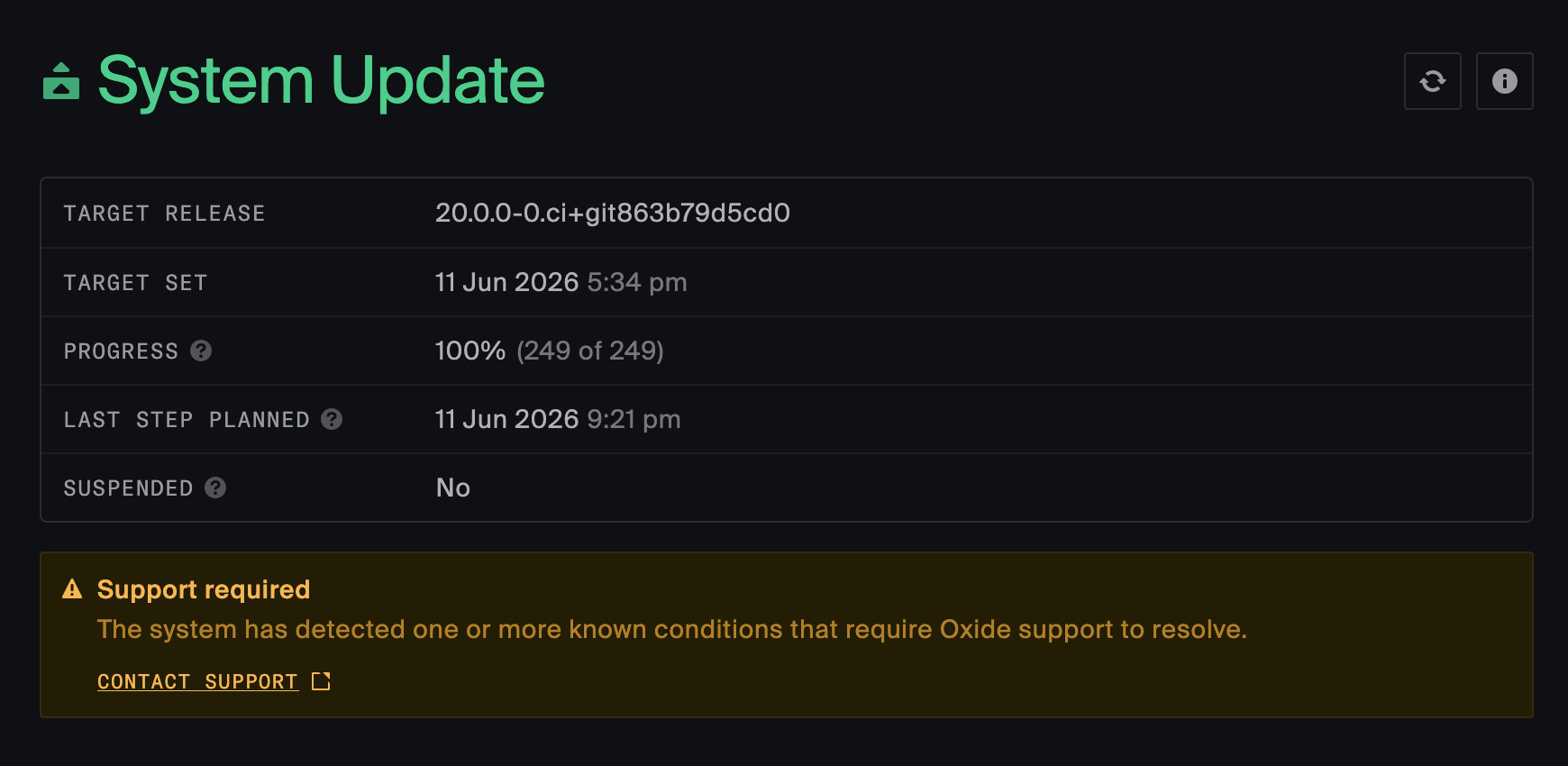
Task: Check for contact_support flag
Use the oxide system update status command to see the status of the contact support field
$ oxide system update status
{
  "target_release": {
    time_requested: "2026-06-11T05:34:02.158806Z",
    version: "20.0.0-0.ci+git863b79d5cd0"
  },
  "components_by_release_version": {
    "20.0.0-0.ci+git863b79d5cd0": 249
  },
  "time_last_step_planned": "2026-04-16T07:08:43.121286Z",
  "suspended": false,
  "contact_support": false
}
If viewing only through the console, the contact support field won’t be present. If there is an issue, a warning will appear instead.
Task: Checking why the contact support field in system update status is true
Every time the "system update status" endpoint is called, the system checks for a small set of known issues. If any are found, it reports contact_support: true.
Prior to the update, this flag indicates issues that could prevent an update from proceeding normally. During the update, this flag indicates that the update has stopped and requires support intervention to continue. After the update, this flag indicates that the update may have resulted in a system that’s not fully working.
The API doesn’t say anything else because this isn’t customer-actionable. Details are available in the Nexus log that serviced the API request.
This is an example of how the log entry would look in a very unhealthy system:
00:11:54.269Z WARN e6bff1ff-24fb-49dc-a54e-c6a350cd4d6c (dropshot_external): found problems in the system before or after an update
    authenticated = true
    enabled_smf_services_not_online_by_sled = {1cd22575-85e2-471d-88fd-3ec5c5e61ed6 (sled): SvcsEnabledNotOnline(SvcsEnabledNotOnline { services: [SvcEnabledNotOnline { fmri: "svc:/system/test2:default", zone: "global", state: Offline }, SvcEnabledNotOnline { fmri: "svc:/system/test:default", zone: "global", state: Maintenance }], errors: [], time_of_status: 2026-05-11T07:34:08.063055Z })}
    local_addr = 127.0.0.1:12220
    method = GET
    remote_addr = 127.0.0.1:61900
    req_id = 9ed1b600-1963-4691-b400-2a78c0cea4ba
    silo_id = 980314eb-2969-4a13-b407-be9f3d93d330
    silo_user_id = 41278141-e86f-41e8-b398-b0310a62d0ca
    stale_inventory_collection_time_done = 2026-05-11T07:13:58.399541007Z
    stuck_sagas = [StuckSaga { id: SagaId(1f0d13c3-6c81-43d0-b4ae-7c74e0ec45ef), name: "test stuck saga" }, StuckSaga { id: SagaId(f59a5b82-be73-4b04-9e7d-6d252663f605), name: "test stuck saga" }]
    stuck_update_time_last_step_planned = 2026-05-11T07:03:58.399545477Z
    type = silo_user
    unhealthy_zpools_by_sled = {1cd22575-85e2-471d-88fd-3ec5c5e61ed6 (sled): [Zpool { time_collected: 2026-05-11T07:34:08.063086Z, id: b5383b08-68bf-4653-bb55-6bd1ff601d1b (zpool), total_size: ByteCount(1048576), health: Degraded }]}
    uri = /v1/system/update/status
A few things to note:
If you call the update status endpoint during an update, the health checks won’t run and no problems will be reported unless the system considers an update to be stuck.
There are many conditions outside the context of a self-service update that can transiently cause
contact_support: true, such as when a sled is rebooting or a MUPdate is in progress. This flag should only be used to determine if it’s okay to proceed with a self-service update, if a self-service update is stuck, or if a self-service update appears to have introduced a serious problem.
Task: Checking recent Reconfigurator activity
Prerequisite: see Task: Using omdb.
The first step in figuring out what Reconfigurator is up to is omdb reconfigurator history:
root@oxz_switch0:~# omdb reconfigurator history
note: database URL not specified.  Will search DNS.
note: (override with --db-url or OMDB_DB_URL)
note: using DNS server for subnet fd00:1122:3344::/48
note: (if this is not right, use --dns-server to specify an alternate DNS server)
note: using database URL postgresql://root@[fd00:1122:3344:109::3]:32221,[fd00:1122:3344:105::3]:32221,[fd00:1122:3344:10b::3]:32221,[fd00:1122:3344:107::3]:32221,[fd00:1122:3344:108::3]:32221/omicron?sslmode=disable
note: database schema version matches expected (203.0.0)
VERSN TIME                     BLUEPRINT
... (earlier history omitted)
34638 2025-11-05T03:00:06.058Z 3b42e013-b93a-4caf-bb59-c9384636ced1  enabled: expunge Nexus zone 9cb56823-d8a3-43e6-8152-2fe927624bec for update
34639 2025-11-05T03:00:07.104Z 0ce94f3d-c3e3-4845-9e97-9f3c89acb3c9  enabled: expunge Nexus zone 73341364-f5a7-449f-a676-46b08008edb1 for update
34640 2025-11-05T03:00:08.152Z 32b080b2-3730-41ac-b9cc-971b5fb9a5e3  enabled: expunge Nexus zone b011cd4f-0229-4ef9-aa2e-f230d5d490e9 for update
34641 2025-11-05T03:00:43.490Z d4d61df2-93fd-404d-b775-a6142da7b4e6  enabled:
34642 2025-11-05T23:19:19.586Z b08ea728-1470-47cb-9cf3-6afecb4a6131  enabled: update Sled 7 (BRM27230045) host phase 1 to 17.0.0-0.ci+gitf83a43dbb42
This command prints out the sequence of blueprints, going back a fixed maximum (you can configure this with --limit) and ending with the current target. The columns here are:
VERSN: which sequential target blueprint this is (each new target blueprint gets the next integer; note that enable/disable is represented as a change here)TIME: the time when this blueprint was made the targetBLUEPRINT: the blueprint id, followed by whether execution was enabled at that point, followed by a machine-generated, human-readable summary of the changes in this blueprint relative to the previous target (called the blueprint comment)
With --diff, shows details about what changed in each step. For example:
root@oxz_switch0:~# omdb reconfigurator history --limit 3 --diff
note: database URL not specified.  Will search DNS.
note: (override with --db-url or OMDB_DB_URL)
note: using DNS server for subnet fd00:1122:3344::/48
note: (if this is not right, use --dns-server to specify an alternate DNS server)
note: using database URL postgresql://root@[fd00:1122:3344:109::3]:32221,[fd00:1122:3344:105::3]:32221,[fd00:1122:3344:10b::3]:32221,[fd00:1122:3344:107::3]:32221,[fd00:1122:3344:108::3]:32221/omicron?sslmode=disable
note: database schema version matches expected (203.0.0)
VERSN TIME                     BLUEPRINT
... (earlier history omitted)
34640 2025-11-05T03:00:08.152Z 32b080b2-3730-41ac-b9cc-971b5fb9a5e3  enabled: expunge Nexus zone b011cd4f-0229-4ef9-aa2e-f230d5d490e9 for update
34641 2025-11-05T03:00:43.490Z d4d61df2-93fd-404d-b775-a6142da7b4e6  enabled:
from: blueprint 32b080b2-3730-41ac-b9cc-971b5fb9a5e3
to:   blueprint d4d61df2-93fd-404d-b775-a6142da7b4e6

 MODIFIED SLEDS:

  sled 7b473a3b-4ec2-4b58-8376-9b3cb68d1392 (active, config generation 269):

...
    omicron zones:
    --------------------------------------------------------------------------------------------------------------------------------------------
    zone type      zone id                                image source                                   disposition      underlay IP
    --------------------------------------------------------------------------------------------------------------------------------------------
*   nexus          9cb56823-d8a3-43e6-8152-2fe927624bec   artifact: version 17.0.0-0.ci+git81d822614e1   - expunged ⏳     fd00:1122:3344:127::45
     └─                                                                                                  + expunged ✓
...
34642 2025-11-05T23:19:19.586Z b08ea728-1470-47cb-9cf3-6afecb4a6131  enabled: update Sled 7 (BRM27230045) host phase 1 to 17.0.0-0.ci+gitf83a43dbb42
from: blueprint d4d61df2-93fd-404d-b775-a6142da7b4e6
to:   blueprint b08ea728-1470-47cb-9cf3-6afecb4a6131

 MODIFIED SLEDS:

  sled 7b473a3b-4ec2-4b58-8376-9b3cb68d1392 (active, config generation 269 -> 270):

    host phase 2 contents:
    -----------------------------------------------------
    slot   boot image source
    -----------------------------------------------------
*   A      - artifact: version 17.0.0-0.ci+git81d822614e1
     └─    + artifact: version 17.0.0-0.ci+gitf83a43dbb42
    B      artifact: version 17.0.0-0.ci+gite980820e5b5
...
 PENDING MGS UPDATES:

    Pending MGS-managed updates (all baseboards):
    ------------------------------------------------------------------------------------------------------------------------------------------------------------------------------------------------------------------------------------------------------------------------------------------------------------------------------------------------------------------------------------------------------------------------------------------------------------------------------------------------------------------------------------------------------------------------------------------------------------------------------------------------------------------------------------------------------------------------------------------------------------------------------
    sp_type   slot   part_number   serial_number   artifact_hash                                                      artifact_version             details
    ------------------------------------------------------------------------------------------------------------------------------------------------------------------------------------------------------------------------------------------------------------------------------------------------------------------------------------------------------------------------------------------------------------------------------------------------------------------------------------------------------------------------------------------------------------------------------------------------------------------------------------------------------------------------------------------------------------------------------------------------------------------------------
+   sled      7      913-0000019   BRM27230045     65d649aaab5e1bd259b560265692cc7693702c4913e1dfcd74a923a38380dc69   17.0.0-0.ci+gitf83a43dbb42   HostPhase1(PendingMgsUpdateHostPhase1Details { expected_active_phase_1_slot: B, expected_boot_disk: B, expected_active_phase_1_hash: ArtifactHash("9682103e283a7d3e3e5044df1ad64308a5749b4f5b66f3964f556498546826de"), expected_active_phase_2_hash: ArtifactHash("d923fe48bafc1d9c6755b21f964d1a522fb99790a0cb601f92671a98dd653c7c"), expected_inactive_phase_1_hash: ArtifactHash("320c9b0fedc4dbe1d17399d6529ac8fd9b46f801084adc1af3c194abd2ee14ba"), expected_inactive_phase_2_hash: ArtifactHash("654d8c78df4d80b72c467b5334757fcc6d3c1035be5eab93cc5c88feab6a870a"), sled_agent_address: [fd00:1122:3344:127::1]:12345 })
This is the same as using omdb nexus blueprints diff BLUEPRINT_ID on the corresponding BLUEPRINT_ID.
Task: Check progress / which components have been updated
Prerequisite: see Task: Using omdb.
The best measure of update progress we have available is the fraction of components currently running the new release. You can quickly see how many components are running each release with omdb nexus update-status:
root@oxz_switch0:~# omdb nexus update-status
note: Nexus URL not specified.  Will pick one from DNS.
note: using DNS server for subnet fd00:1122:3344::/48
note: (if this is not right, use --dns-server to specify an alternate DNS server)
note: using Nexus URL http://[fd00:1122:3344:127::48]:12232
Count of each component type by system version:

                  |17.0.0-0.ci+gitf83a43dbb42
------------------+---------------------------
RoT bootloader    |15
RoT               |15
SP                |15
Host OS (phase 1) |12
Host OS (phase 2) |12
Zone              |157

To see each individual component, rerun with `--details`.
During an update, you’ll see an extra column here for the other release. Initially, all components will be at the older release. By the end, all components will be at the newer release.
You may also see these columns instead of a particular release:
error: the component’s current version could not be determined, usually because the component is offline. It’s common to see this transiently during an update since components are frequently restarting.install-dataset: the component is a control plane zone that’s configured to run not from software distributed by an official update, but from the sled’s "install" dataset. This usually means either this system has never done an automated update (i.e., systems from the factory look like this) or else a MUPdate has been done and not fully resolved.unknown: the component’s version does not match a TUF repo that the system knows about. This can happen for SP and RoT components from the factory or that have been MUPdated before the MUPdate has been resolved.
You can see the specific value for each component with the --details flag.
Task: Collecting information about Nexus background tasks
Prerequisite: see Task: Using omdb.
The omdb nexus background-tasks command shows information about the most recent activation of a background task, as well as whether it’s currently running or when it will run next.
Remember that every Nexus runs all these background tasks independently. By default the omdb nexus command picks an arbitrary Nexus instance. So if you run it multiple times, you may see apparently-contradictory information (like: "it’s running now" and then "it’s not running and last finished 2 minutes ago") because it came from different Nexus instances.
You may or may not care which Nexus instance you’re looking at, depending on the problem you’re debugging. Most of the time, you don’t need to care because if there’s a problem (like the upgrade is stuck) or if things are working normally, all the Nexus instances will report basically the same thing. If you’re debugging a problem from a specific step or that appears to be specific to one Nexus instance, you’ll need to use the --nexus-internal-url option or OMDB_NEXUS_URL environment variable to point omdb at a specific one.
The most important background tasks for Reconfigurator are:
| Generates blueprints to take the next step in upgrade, etc. |
| Executes the current target blueprint. |
| Collects inventory (ground truth) from all components in the system. Check here if Nexus seems to be operating from an out-of-date inventory. |
Here’s an example of printing the status of inventory collection:
root@oxz_switch0:~# omdb nexus background-tasks show inventory_collection
note: Nexus URL not specified.  Will pick one from DNS.
note: using DNS server for subnet fd00:1122:3344::/48
note: (if this is not right, use --dns-server to specify an alternate DNS server)
note: using Nexus URL http://[fd00:1122:3344:10b::3f]:12232
task: "inventory_collection"
  configured period: every 10m(1)
  currently executing: iter 1302, triggered by a dependent task completing(2)
    started at 2025-11-05T22:53:52.465Z, running for 30967ms(3)
  last completed activation: iter 1301, triggered by a dependent task completing
    started at 2025-11-05T22:53:10.466Z (72s ago) and ran for 41997ms(4)
    last collection id:      caac62c8-1f38-4c2b-ab41-7285ed0a8061
    last collection started: 2025-11-05T22:53:11Z
    last collection done:    2025-11-05T22:53:51Z
All but the last three lines of output here are common to all background tasks. The command shows (1) how often the task runs; (2) whether it’s currently running, why, and (3) for how long; and (4) the same information about the last time it did run.
For more on the task-specific output, see:
Other Reconfigurator-related tasks include:
| Distributes software artifacts to all sleds. Check here if software artifacts are unexpectedly missing from sleds. |
| Loads the latest blueprint from the database for use by the blueprint executor and other parts of Nexus. Check here if Nexus seems to keep executing an old blueprint. |
| Updates tables used by other parts of the system (e.g., instance and disk allocation) for changes made by Reconfigurator. |
| Fetches the latest inventory collection from the database for use by the planner and other parts of Nexus. Check here if Nexus seems to be using an old inventory and you’ve already checked that a newer one exists. |
| Fetches the latest Reconfigurator configuration from the database and makes it available to the planner/executor. Check here if configuration changes don’t seem to have taken effect. |
| Marks TUF repositories for automatic removal once they’re no longer needed. Check here if the system is out of space for new TUF repositories or if some repository’s artifacts are unexpectedly missing. |
| Removes old blueprints from the database |
Here’s an example from the tuf_repo_pruner explaining the choices it’s made about which repos to keep:
# omdb nexus background-tasks show tuf_repo_pruner
note: Nexus URL not specified.  Will pick one from DNS.
note: using DNS server for subnet fd00:1122:3344::/48
note: (if this is not right, use --dns-server to specify an alternate DNS server)
note: using Nexus URL http://[fd00:1122:3344:10b::3f]:12232
task: "tuf_repo_pruner"
  configured period: every 5m
  currently executing: no
  last completed activation: iter 240, triggered by a periodic timer firing
    started at 2025-11-05T22:55:28.472Z (115s ago) and ran for 30ms
    configuration:
        nkeep_recent_releases: 3
        nkeep_recent_uploads:  3
    repo pruned: none
    repos kept because they're recent target releases:
        2ff3c40b-6f24-4a06-962e-6c7ac9ce6a89 (17.0.0-0.ci+git81d822614e1, created 2025-11-04 22:17:21.744337 UTC)
        5d432bc8-a253-4cf1-b82f-f04eb66525b5 (17.0.0-0.ci+gite980820e5b5, created 2025-11-04 21:18:21.063830 UTC)
        c4e0fba1-77f5-467e-9410-67446420e786 (17.0.0-0.ci+git495eab19cfc, created 2025-10-31 23:54:18.712705 UTC)
    repos kept because they're recent uploads:
        175cb0bc-2452-470b-97ca-62f9a76b2c87 (17.0.0-0.ci+gitcf97c145a6e, created 2025-10-30 05:14:08.663880 UTC)
        f7e6ce64-9ef8-4981-923a-47f1d137e375 (17.0.0-0.ci+gitc5c0834b174, created 2025-10-30 00:44:34.710716 UTC)
    other repos eligible for pruning: none
Task: Checking the status of the blueprint planner
Prerequisite: Task: Collecting information about Nexus background tasks.
Here’s example output from the blueprint planner:
root@oxz_switch0:~# omdb nexus background-tasks show blueprint_planner
note: Nexus URL not specified.  Will pick one from DNS.
note: using DNS server for subnet fd00:1122:3344::/48
note: (if this is not right, use --dns-server to specify an alternate DNS server)
note: using Nexus URL http://[fd00:1122:3344:10b::3f]:12232
task: "blueprint_planner"
  configured period: every 1m
  currently executing: no
  last completed activation: iter 3892, triggered by a dependent task completing
    started at 2025-11-05T22:59:26.198Z (4s ago) and ran for 729ms
    plan unchanged from parent d4d61df2-93fd-404d-b775-a6142da7b4e6(1)
    note: 419/5000 blueprints in database(2)
planning report:(3)
* will ensure cockroachdb setting: "22.1"
Of particular note are:
Although the planner ran 4s ago, it did not save the resulting blueprint or change the system’s target because the new blueprint was identical to the current target blueprint,
d4d61df2-93fd-404d-b775-a6142da7b4e6.There are currently 419 blueprints in the database. The maximum is 5000. If the maximum number is reached (i.e., if there are 5000 blueprints in the database), the planner will not create a new one for fear that something is very wrong and filling the database will make it worse.
As the name suggests, the planning report describes what’s important about the most recently generated blueprint. (In this case, that’s the blueprint that was thrown away because it was identical to its parent.) See Task: Understanding planning reports.
If the blueprint limit has been reached, you’d see something like this:
root@oxz_switch0:~# omdb nexus background-tasks show blueprint_planner
note: Nexus URL not specified. Will pick one from DNS.
note: using DNS server for subnet fd00:1122:3344::/48
note: (if this is not right, use --dns-server to specify an alternate DNS server)
note: using Nexus URL http://[fd00:1122:3344:102::4]:12232
task: "blueprint_planner" configured
  period: every 1m
  currently executing: no
  last completed activation: iter 83, triggered by a periodic timer firing
    started at 2025-10-07T21:18:28.619Z (2s ago) and ran for 251ms
    blueprint auto-planning disabled because current blueprint count >= limit (5000); planning report contains what would have been stored had the limit not been reached
planning report:
...
Task: Checking the status of the blueprint executor
Prerequisite: Task: Collecting information about Nexus background tasks.
Here’s example output from the blueprint executor:
root@oxz_switch0:~# omdb nexus background-tasks show blueprint_executor
note: Nexus URL not specified.  Will pick one from DNS.
note: using DNS server for subnet fd00:1122:3344::/48
note: (if this is not right, use --dns-server to specify an alternate DNS server)
note: using Nexus URL http://[fd00:1122:3344:10b::3f]:12232
task: "blueprint_executor"
  configured period: every 1m
  currently executing: iter 1216, triggered by a periodic timer firing
    started at 2025-11-05T23:13:35.767Z, running for 5119ms
  last completed activation: iter 1215, triggered by a periodic timer firing
    started at 2025-11-05T23:12:35.765Z (65s ago) and ran for 5388ms
    target blueprint: d4d61df2-93fd-404d-b775-a6142da7b4e6
    execution:        enabled
    status:           completed (15 steps)
    error:            (none)
This indicates that the system successfully executed target blueprint d4d61df2-93fd-404d-b775-a6142da7b4e6 with no errors or warnings. You can see more detail about the steps run using print-report:
root@oxz_switch0:~# omdb nexus background-tasks print-report blueprint_executor
note: Nexus URL not specified.  Will pick one from DNS.
note: using DNS server for subnet fd00:1122:3344::/48
note: (if this is not right, use --dns-server to specify an alternate DNS server)
note: using Nexus URL http://[fd00:1122:3344:10b::3f]:12232
[Nov 05 23:13:35]   Running ( 1/15) Ensure external networking resources
[Nov 05 23:13:36] Completed ( 1/15) Ensure external networking resources: after 1.02s
[Nov 05 23:13:36]   Running ( 2/15) Fetch sled list
[Nov 05 23:13:36] Completed ( 2/15) Fetch sled list: after 93.33ms
[Nov 05 23:13:36]   Running ( 3/15) Ensure db_metadata_nexus_state records exist
[Nov 05 23:13:36] Completed ( 3/15) Ensure db_metadata_nexus_state records exist: after 54.31ms
[Nov 05 23:13:36]   Running ( 4/15) Deploy sled configs
[Nov 05 23:13:38] Completed ( 4/15) Deploy sled configs: after 1.92s
[Nov 05 23:13:38]   Running ( 5/15) Plumb service firewall rules
[Nov 05 23:13:39] Completed ( 5/15) Plumb service firewall rules: after 810.77ms
[Nov 05 23:13:39]   Running ( 6/15) Deploy DNS records
[Nov 05 23:13:39] Completed ( 6/15) Deploy DNS records: after 173.48ms
[Nov 05 23:13:39]   Running ( 7/15) Cleanup expunged zones
[Nov 05 23:13:40] Completed ( 7/15) Cleanup expunged zones: after 453.93ms
[Nov 05 23:13:40]   Running ( 8/15) Decommission sleds
[Nov 05 23:13:40] Completed ( 8/15) Decommission sleds: after 243.18ms
[Nov 05 23:13:40]   Running ( 9/15) Decommission expunged disks
[Nov 05 23:13:41] Completed ( 9/15) Decommission expunged disks: after 760.83ms
[Nov 05 23:13:41]   Running (10/15) Deploy clickhouse cluster nodes
[Nov 05 23:13:41] Completed (10/15) Deploy clickhouse cluster nodes: after 427.06ms
[Nov 05 23:13:41]   Running (11/15) Deploy single-node clickhouse cluster
[Nov 05 23:13:41] Completed (11/15) Deploy single-node clickhouse cluster: after 119.64ms
[Nov 05 23:13:41]   Running (12/15) Mark support bundles as failed if they rely on an expunged disk or sled
[Nov 05 23:13:41] Completed (12/15) Mark support bundles as failed if they rely on an expunged disk or sled: after 65.81ms with message: support bundle expunge report: SupportBundleExpungementReport { bundles_failed_missing_datasets: 0, bundles_deleted_missing_datasets: 0, bundles_failing_missing_nexus: 0, bundles_reassigned: 0 }
[Nov 05 23:13:41]   Running (13/15) Reassign sagas
[Nov 05 23:13:42] Completed (13/15) Reassign sagas: after 155.91ms
[Nov 05 23:13:42]   Running (14/15) Ensure CockroachDB settings
[Nov 05 23:13:42] Completed (14/15) Ensure CockroachDB settings: after 16.33ms
[Nov 05 23:13:42]   Running (15/15) Kick off MGS-managed updates
[Nov 05 23:13:42] Completed (15/15) Kick off MGS-managed updates: after 6.43µs
Problems during blueprint execution may show up in the error field, the warning field, or in the report. Here’s an example where a step failed because of a timeout trying to make a request to sled agent:
support@oxz_switch1:~$ omdb nexus background-tasks show blueprint_executor
task: "blueprint_executor"
  configured period: every 1m
  currently executing: iter 263375, triggered by a periodic timer firing
    started at 2025-10-22T16:35:45.831Z, running for 57780ms
  last completed activation: iter 263374, triggered by a periodic timer firing
    started at 2025-10-22T16:34:33.182Z (130s ago) and ran for 72646ms
    target blueprint: 6d1c8722-01cb-42aa-bb3c-271982b7453c
    execution:        enabled
    status:           completed (13 steps)
    warning:          at: Deploy sled configs: Failed to put OmicronSledConfig {
                          disks_config: OmicronPhysicalDisksConfig {
                              generation: Generation(
                                  6,
                              ),
                              disks: [
                                  ...
                              ],
                          },
                      } to sled 19410430-5e2e-43b8-afbb-fe86cf07a5fd: Communication Error: error sending request for url (http://[fd00:1122:3344:106::1]:12345/omicron-config): error sending request for url (http://[fd00:1122:3344:106::1]:12345/omicron-config): operation timed out
    error:            (none)
Task: Collecting detailed Reconfigurator debugging state
Prerequisite: see Task: Using omdb
You can bundle up all the Reconfigurator-related state from a live system with:
$ omdb reconfigurator export reconfigurator.out
note: database URL not specified.  Will search DNS.
note: (override with --db-url or OMDB_DB_URL)
note: using DNS server for subnet fd00:1122:3344::/48
note: (if this is not right, use --dns-server to specify an alternate DNS server)
note: using database URL postgresql://root@[fd00:1122:3344:102::4]:32221,[fd00:1122:3344:101::3]:32221,[fd00:1122:3344:101::4]:32221,[fd00:1122:3344:102::3]:32221,[fd00:1122:3344:103::3]:32221/omicron?sslmode=disable
note: database schema version matches expected (144.0.0)
assembling reconfigurator state ... done
wrote reconfigurator.out
You can copy that file around as needed, including off the system and onto one that has reconfigurator-cli for debugging it. This state is everything that goes into planning and so should be sufficient for reproducing situations where the planner is making poor choices.
There’s more about this workflow in the Reconfigurator Dev Guide.
Task: Collecting planning reports
Prerequisite: see Task: Using omdb
When the planner generates blueprints, it also generates a planning report that includes information about the choices it made, including the changes made and the changes that it wanted to make but couldn’t (i.e., what’s blocked).
You typically get a planning report from one of two places:
Using
omdb db blueprints planner-report show BLUEPRINT_ID. This can show you the planning report for any blueprint in the database.From the
blueprint_plannerbackground task. This shows the planning report for the most recent blueprint the planner generated, whether or not that blueprint was saved to the database or became the target.This is most important when the system is stuck for some reason because in that case the planner may generate a blueprint that’s identical to the current target, but has a planning report with different information in it. If you want to understand why the system is stuck, it’s usually most helpful to look at the planning report for the blueprints currently not being saved because they make no changes.
Here’s an example:
root@oxz_switch0:~# omdb db blueprints planner-report show 1b296f96-2425-41f8-ba69-a41272e84f06
note: database URL not specified.  Will search DNS.
note: (override with --db-url or OMDB_DB_URL)
note: using DNS server for subnet fd00:1122:3344::/48
note: (if this is not right, use --dns-server to specify an alternate DNS server)
note: using database URL postgresql://root@[fd00:1122:3344:109::3]:32221,[fd00:1122:3344:105::3]:32221,[fd00:1122:3344:10b::3]:32221,[fd00:1122:3344:107::3]:32221,[fd00:1122:3344:108::3]:32221/omicron?sslmode=disable
note: database schema version matches expected (203.0.0)
WARNING: planner report debug log was produced by a Nexus on git commit cf97c145a6e571a490e4efc8a63853f7b5d8aa55, but omdb was built from f83a43dbb42ff5c03e69f223dda68fbf8443ae30. We will attempt to parse it anyway.
planner report for blueprint 1b296f96-2425-41f8-ba69-a41272e84f06:
planning report:
* 1 pending MGS update:
  * 913-0000019:BRM42220006: Sp(PendingMgsUpdateSpDetails { expected_active_version: ArtifactVersion("1.0.48"), expected_inactive_version: Version(ArtifactVersion("1.0.47")) })
* 1 blocked MGS update:
  * 913-0000019:BRM27230045: failed to plan a Host OS update: sled agent info is not in inventory
* waiting for NTP zones to appear in inventory on sleds: 7b473a3b-4ec2-4b58-8376-9b3cb68d1392
* zone updates waiting on pending MGS updates (RoT bootloader / RoT / SP / Host OS)
* waiting to update top-level nexus_generation: some non-Nexus zone are not yet updated
* will ensure cockroachdb setting: "22.1"
Next, see Task: Understanding planning reports.
Task: Understanding planning reports
Prerequisite: see Task: Collecting planning reports
Planning reports include details about why the planner made the choices that it made. Here’s an example:
planner report for blueprint 1b296f96-2425-41f8-ba69-a41272e84f06:
planning report:
* 1 pending MGS update:
  * 913-0000019:BRM42220006: Sp(PendingMgsUpdateSpDetails { expected_active_version: ArtifactVersion("1.0.48"), expected_inactive_version: Version(ArtifactVersion("1.0.47")) })
* 1 blocked MGS update:
  * 913-0000019:BRM27230045: failed to plan a Host OS update: sled agent info is not in inventory
* waiting for NTP zones to appear in inventory on sleds: 7b473a3b-4ec2-4b58-8376-9b3cb68d1392
* zone updates waiting on pending MGS updates (RoT bootloader / RoT / SP / Host OS)
* waiting to update top-level nexus_generation: some non-Nexus zone are not yet updated
* will ensure cockroachdb setting: "22.1"
This report is telling us:
The planner has either kicked off or elected to continue an SP update for sled BRM42220006.
The planner wanted to update the host OS on sled BRM27230045, but couldn’t because there was no information from that sled’s sled agent in the inventory collection that the planner used. In this case, it’s likely that we had just rebooted this sled and the sled agent was not back online when the system collected inventory.
The planner cannot proceed with zone updates because there are pending MGS updates.
The planner also cannot proceed with Nexus handoff because there are non-Nexus zones not yet updated.
This is a pretty typical report from early in an upgrade, when SPs and host OS’s are still being updated. However, if the system got stuck in this state, the questions would be: why is the SP update on BRM42220006 not completing and why is sled BRM27230045’s sled agent persistently absent from inventory?
Here’s an example that shows the system updating sleds in a different order than it otherwise might have because of a safety check:
root@oxz_switch0:~# omdb db blueprints planner-report show 30f282df-7882-4120-85df-c63b6e298933
note: database URL not specified.  Will search DNS.
note: (override with --db-url or OMDB_DB_URL)
note: using DNS server for subnet fd00:1122:3344::/48
note: (if this is not right, use --dns-server to specify an alternate DNS server)
note: using database URL postgresql://root@[fd00:1122:3344:109::3]:32221,[fd00:1122:3344:105::3]:32221,[fd00:1122:3344:10b::3]:32221,[fd00:1122:3344:107::3]:32221,[fd00:1122:3344:108::3]:32221/omicron?sslmode=disable
note: database schema version matches expected (203.0.0)
WARNING: planner report debug log was produced by a Nexus on git commit 81d822614e132479647ae8ca24e53023a88bba47, but omdb was built from f83a43dbb42ff5c03e69f223dda68fbf8443ae30. We will attempt to parse it anyway.
planner report for blueprint 30f282df-7882-4120-85df-c63b6e298933:
planning report:
* 1 pending MGS update:
  * 913-0000019:BRM42220016: HostPhase1(PendingMgsUpdateHostPhase1Details { expected_active_phase_1_slot: A, expected_boot_disk: A, expected_active_phase_1_hash: ArtifactHash("320c9b0fedc4dbe1d17399d6529ac8fd9b46f801084adc1af3c194abd2ee14ba"), expected_active_phase_2_hash: ArtifactHash("f298f4de28b9562c7259dc9a325a2c7cbbba28266a1445d389114cb2ccc51bc7"), expected_inactive_phase_1_hash: ArtifactHash("320c9b0fedc4dbe1d17399d6529ac8fd9b46f801084adc1af3c194abd2ee14ba"), expected_inactive_phase_2_hash: ArtifactHash("d923fe48bafc1d9c6755b21f964d1a522fb99790a0cb601f92671a98dd653c7c"), sled_agent_address: [fd00:1122:3344:10a::1]:12345 })
* 1 blocked MGS update:
  * 913-0000019:BRM42220014: failed to plan a Host OS update: sled contains zones that are unsafe to shut down: "e86845b5-eabd-49f5-9a10-6dfef9066209: cockroach unsafe to shut down: not enough nodes"
* zone updates waiting on pending MGS updates (RoT bootloader / RoT / SP / Host OS)
* waiting to update top-level nexus_generation: some non-Nexus zone are not yet updated
* will ensure cockroachdb setting: "22.1"
The interesting bit here is the "blocked MGS update" for sled BRM42220014. It’s saying that it would have updated the host OS on that sled, but that sled has a CockroachDB node on it and some other CockroachDB node is down. Again, this is common during an update for a little while (i.e., immediately after the system updated a different sled that had a CockroachDB node on it). If it got stuck in this state, you’d want to debug why the CockroachDB cluster wasn’t becoming healthy again.
For more on different ways the planner can be blocked and what they mean, see Debugging why the planner is blocked.
Task: Collecting details about ongoing MGS-driven updates
Prerequisite: see Task: Using omdb.
You can use omdb nexus mgs-updates to fetch information from Nexus about any MGS-driven updates that it’s working on. This output includes information on any current update attempts as well as a history of recent updates. Here’s an example:
# omdb nexus mgs-updates
note: Nexus URL not specified.  Will pick one from DNS.
note: using DNS server for subnet fd00:1122:3344::/48
note: (if this is not right, use --dns-server to specify an alternate DNS server)
note: using Nexus URL http://[fd00:1122:3344:104::3]:12232
recent completed attempts:
    2025-10-08T23:07:49.750Z to 2025-10-08T23:07:49.827Z (took 77ms): serial BRM27230045
        attempt#: 150
        version:  17.0.0-0.ci+gitb8efb9a08b3
        hash:     3a6940e9917d578eb8c9c81e491f37885fbc044e37741fa2fe36a278e0012747
        result:   Err("failed to fetch artifact: no repo depot clients available")
...
    2025-10-08T23:22:51.943Z to 2025-10-08T23:22:52.013Z (took 69ms): serial BRM27230045
        attempt#: 165
        version:  17.0.0-0.ci+gitb8efb9a08b3
        hash:     3a6940e9917d578eb8c9c81e491f37885fbc044e37741fa2fe36a278e0012747
        result:   Err("failed to fetch artifact: no repo depot clients available")

currently in progress:

waiting for retry:
    serial BRM27230045: will try again at 2025-10-08 23:23:52.013361249 UTC (attempt 166)
This is saying:
There have been several recent attempts to update some component on BRM27230045. They’ve all failed.
There is no update attempt in progress.
Another attempt will begin shortly.
Note that the particular error reported here was a bug. You should not see this specific error on real systems.
Task: Checking the latest inventory collection
Prerequisite: see Task: Using omdb.
Nexus instances periodically collect a full inventory of the system and store it into the database. Only the most recent few are kept. You can list available ones:
root@oxz_switch0:~# omdb db inventory collections list
note: database URL not specified.  Will search DNS.
note: (override with --db-url or OMDB_DB_URL)
note: using DNS server for subnet fd00:1122:3344::/48
note: (if this is not right, use --dns-server to specify an alternate DNS server)
note: using database URL postgresql://root@[fd00:1122:3344:109::3]:32221,[fd00:1122:3344:105::3]:32221,[fd00:1122:3344:10b::3]:32221,[fd00:1122:3344:107::3]:32221,[fd00:1122:3344:108::3]:32221/omicron?sslmode=disable
note: database schema version matches expected (203.0.0)
ID                                   STARTED              TOOK     NSPS NERRORS
43a3df0e-f197-498f-b6b5-dfcf00c44506 2025-11-07T19:33:53Z 37197 ms 16   2
b0402300-4a81-4fa9-aaf6-4928cbce6aa8 2025-11-07T19:34:03Z 37411 ms 16   2
f4e848c7-3285-4d04-93ae-75469cfede30 2025-11-07T19:34:09Z 42685 ms 16   2
8f67cea3-637b-47e2-96a4-8d10f41b6d9b 2025-11-07T19:34:51Z 33085 ms 16   2
You can view specific ones or latest with:
root@oxz_switch0:~# omdb db inventory collections show latest
note: database URL not specified.  Will search DNS.
note: (override with --db-url or OMDB_DB_URL)
note: using DNS server for subnet fd00:1122:3344::/48
note: (if this is not right, use --dns-server to specify an alternate DNS server)
note: using database URL postgresql://root@[fd00:1122:3344:109::3]:32221,[fd00:1122:3344:105::3]:32221,[fd00:1122:3344:10b::3]:32221,[fd00:1122:3344:107::3]:32221,[fd00:1122:3344:108::3]:32221/omicron?sslmode=disable
note: database schema version matches expected (203.0.0)
collection: 1ac3782b-0761-43b2-8371-bf3ee4127f1c
collector:  cd808279-f4f3-4aeb-82ad-efa5fe69241f (likely a Nexus instance)
started:    2025-11-07T19:31:56.803Z
done:       2025-11-07T19:32:41.208Z
errors:     0
...
Note that this will produce a ton of output. There’s a lot of information in an inventory collection.
Task: Understanding an inventory collection
This section walks through the omdb db collections inventory show output. It’s not exhaustive.
Metadata and atomicity
Example:
root@oxz_switch0:~# omdb db inventory collections show latest
note: database URL not specified.  Will search DNS.
note: (override with --db-url or OMDB_DB_URL)
note: using DNS server for subnet fd00:1122:3344::/48
note: (if this is not right, use --dns-server to specify an alternate DNS server)
note: using database URL postgresql://root@[fd00:1122:3344:109::3]:32221,[fd00:1122:3344:105::3]:32221,[fd00:1122:3344:10b::3]:32221,[fd00:1122:3344:107::3]:32221,[fd00:1122:3344:108::3]:32221/omicron?sslmode=disable
note: database schema version matches expected (203.0.0)
collection: 095090fc-93e2-4123-bb3a-7fc45faedbaa
collector:  cd808279-f4f3-4aeb-82ad-efa5fe69241f (likely a Nexus instance)
started:    2025-11-07T19:37:52.828Z
done:       2025-11-07T19:38:31.797Z
This tells us:
This inventory was collected by Nexus instance
cd808279-f4f3-4aeb-82ad-efa5fe69241f.This inventory collection started at
2025-11-07T19:37:52.828Z. Changes from before that are reflected in it.This inventory collection finished at
2025-11-07T19:38:31.797Z. Changes from after that are not reflected in it.
Errors
Example:
errors:     2
  error 0: MGS "http://[fd00:1122:3344:10b::2]:12225": fetching state of SP SpIdentifier { slot: 29, type_: Sled }: Error Response: status: 503 Service Unavailable; headers: {"content-type": "application/json", "x-request-id": "d4d73b4d-d68c-41aa-ab0b-f4da64061566", "content-length": "198", "date": "Fri, 07 Nov 2025 19:38:07 GMT"}; value: Error { error_code: Some("SpCommunicationFailed"), message: "error communicating with SP SpIdentifier { typ: Sled, slot: 29 }: no SP discovered", request_id: "d4d73b4d-d68c-41aa-ab0b-f4da64061566" }
  error 1: MGS "http://[fd00:1122:3344:108::2]:12225": fetching state of SP SpIdentifier { slot: 29, type_: Sled }: Error Response: status: 503 Service Unavailable; headers: {"content-type": "application/json", "x-request-id": "64909ee6-4c92-47ce-a4fd-f97f50e56d24", "content-length": "198", "date": "Fri, 07 Nov 2025 19:38:26 GMT"}; value: Error { error_code: Some("SpCommunicationFailed"), message: "error communicating with SP SpIdentifier { typ: Sled, slot: 29 }: no SP discovered", request_id: "64909ee6-4c92-47ce-a4fd-f97f50e56d24" }
Errors reflect problems encountered while collecting inventory. They may or may not reflect actual problems with the system. They could reflect a transient failure of some component that’s actually healthy or they could reflect a deeper problem (e.g., a missing sled). In this case, Management Gateway reported 503 errors trying to talk to sled 29. It’s not clear from this output alone what that means.
SP inventory
Example:
Sled BRM27230045
    part number: 913-0000019
    power:    A0
    revision: 13
    MGS slot: Sled 7
This basic information tells us which part number, serial number, and hardware revision was found. "power" reflects the power state (see RFD 81).
found at: 2025-11-07T19:46:21.784Z from http://[fd00:1122:3344:10b::2]:12225This information (reported with all inventory data) tells us exactly when and where this data came from. In this case, this URL is a Management Gateway Service instance.
    host phase 1 active slot: B
    host phase 1 hashes:
        SLOT HASH
        A    65d649aaab5e1bd259b560265692cc7693702c4913e1dfcd74a923a38380dc69
        B    08a8356e36f18d2d0c00820c6d70523788830ae66995a00f0c72200f12dff1f7
    cabooses:
        SLOT       BOARD       NAME        VERSION GIT_COMMIT                               SIGN
        SpSlot0    gimlet-e    gimlet-e    1.0.49  d38a6073d140184b114fb4769445991bf20baf0d n/a
        SpSlot1    gimlet-e    gimlet-e    1.0.49  d38a6073d140184b114fb4769445991bf20baf0d n/a
        RotSlotA   oxide-rot-1 oxide-rot-1 1.0.38  e40997968406278927d41c03d24b4ae6472c375a 5796ee3433f840519c3bcde73e19ee82ccb6af3857eddaabb928b8d9726d93c0
        RotSlotB   oxide-rot-1 oxide-rot-1 1.0.38  e40997968406278927d41c03d24b4ae6472c375a 5796ee3433f840519c3bcde73e19ee82ccb6af3857eddaabb928b8d9726d93c0
        Stage0     oxide-rot-1 oxide-rot-1 1.4.1   bdf56dd950b934360df596ed5b2d8b8813c92168 5796ee3433f840519c3bcde73e19ee82ccb6af3857eddaabb928b8d9726d93c0
        Stage0Next oxide-rot-1 oxide-rot-1 1.4.1   bdf56dd950b934360df596ed5b2d8b8813c92168 5796ee3433f840519c3bcde73e19ee82ccb6af3857eddaabb928b8d9726d93c0
    RoT pages:
        SLOT         DATA_BASE64
        Cmpa         oAAAiAAAAAAAAAAAAAAAAAAA//8AAP//...
        CfpaActive   AAAAAFMAAAAAAAAAAAAAAAAAAAAAAAAA...
        CfpaInactive AAAAAFIAAAAAAAAAAAAAAAAAAAAAAAAA...
        CfpaScratch  AAAAAFMAAAAAAAAAAAAAAAAAAAAAAAAA...
    RoT: active slot: slot A
    RoT: persistent boot preference: slot A
    RoT: pending persistent boot preference: -
    RoT: transient boot preference: -
    RoT: slot A SHA3-256: 87541100ae9707554399633d470816568f487247fb5daf265bf83bcb14d34dce
    RoT: slot B SHA3-256: 9ac717ff6376e108ce01055ebb170a162d348286488ad520437c57ed1dae9557
This tells us about the various components adjacent to the SP that have updateable software (host phase 1, SP itself, RoT, RoT bootloader). It tells us what images are in each component’s A/B firmware slots and which slots are active.
Sled agent inventory
Example:
sled 0c7011f7-a4bf-4daf-90cc-1c2410103300 (role = Gimlet, serial BRM42220057)
    found at:    2025-11-07T19:38:28.729Z from http://[fd00:1122:3344:104::1]:12345
    address:     [fd00:1122:3344:104::1]:12345
    usable hw threads:   128
    CPU family:          amd_milan
    usable memory (GiB): 1011
    reservoir (GiB):     809
This section shows basic information about the sled hardware and when/where all the sled information came from.
The next sections show information about physical disks, zpools configured on them, and ZFS datasets that are present. (This is distinct from the ZFS datasets that are configured to be present.)
    physical disks:
      U2: DiskIdentity { vendor: "1b96", model: "WUS4C6432DSP3X3", serial: "A084A704" } in 0
      U2: DiskIdentity { vendor: "1b96", model: "WUS4C6432DSP3X3", serial: "A084A5DA" } in 1
      ...
      U2: DiskIdentity { vendor: "1b96", model: "WUS4C6432DSP3X3", serial: "A084A60F" } in 9
      M2: DiskIdentity { vendor: "1344", model: "Micron_7300_MTFDHBG1T9TDF", serial: "21413275374B" } in 17
      M2: DiskIdentity { vendor: "1344", model: "Micron_7300_MTFDHBG1T9TDF", serial: "214132748192" } in 18
    zpools
      05715ad8-59a1-44ab-ad5f-0cdffb46baab: total size: 2976 GiB
      2ec2a731-3340-4777-b1bb-4a906c598174: total size: 2976 GiB
      ...
      f96c8d49-fdf7-4bd6-84f6-c282202d1abc: total size: 2976 GiB
    datasets:
      oxp_05715ad8-59a1-44ab-ad5f-0cdffb46baab - id: none, compression: off
        available: 1099346468352 B, used: 1996251210240 B
        reservation: None, quota: None
      oxp_05715ad8-59a1-44ab-ad5f-0cdffb46baab/crucible - id: a76b3357-b690-43b8-8352-3300568ffc2b, compression: off
        available: 1099346468352 B, used: 1930693963 KiB
        reservation: None, quota: None
      ...
      oxp_f96c8d49-fdf7-4bd6-84f6-c282202d1abc/crypt/zone/oxz_crucible_167cf6a2-ec51-4de2-bc6c-7785bbc0e436 - id: 4fb55999-265a-40ed-996d-48a914825619, compression: off
        available: 1235108139520 B, used: 344886784 B
        reservation: None, quota: None
The next section reports the ledgered sled configuration. This is the last configuration received by this sled agent from Nexus and covers the physical disks, ZFS datasets, and Omicron zones that should be in service. Each new configuration gets a new generation number. This is an easy way for both humans and Nexus to determine if the sled’s config is up to date.
LEDGERED SLED CONFIG
    generation: 305
    remove_mupdate_override: None
    desired host phase 2 slot a: artifact 654d8c78df4d80b72c467b5334757fcc6d3c1035be5eab93cc5c88feab6a870a
    desired host phase 2 slot b: artifact 86a2b812218f5a7813a13b5ab3b8f35e1e528e1908cd0a68e4a093c8515d30d8
    DISKS: 9
        ID                                       ZPOOL_ID                                 VENDOR     MODEL               SERIAL
        2affbc9d-a029-4c5f-8c5c-0e900e247781     05715ad8-59a1-44ab-ad5f-0cdffb46baab     1b96       WUS4C6432DSP3X3     A084A723
	...
        ce170025-3cc2-405e-9240-86ea5ef8bb88     2ec2a731-3340-4777-b1bb-4a906c598174     1b96       WUS4C6432DSP3X3     A084A643
    DATASETS: 40
        ID                                       NAME                                                                                                             COMPRESSION     QUOTA       RESERVATION
        08c9d9ea-b048-4bcc-8d5a-a7577dc96467     oxp_613b58fc-5a80-42dc-a61c-b143cf220fb5/crypt/zone                                                              off             none        none
	...
        fcdda266-fc6a-4518-89db-aec007a4b682     oxp_7e1293ad-b903-4054-aeae-2182d5e4a785/crucible                                                                off             none        none
    ZONES: 12
        ID                                       KIND                IMAGE_SOURCE
        167cf6a2-ec51-4de2-bc6c-7785bbc0e436     crucible            artifact: d61910f0ee36e7a9beb51dc82b44342bacccef628a67c8afc74ebb02a3c57fdf
	...
        ff805a1f-414e-479a-bdb0-85b4913095ab     crucible_pantry     artifact: a059ff1c410a46f852f6cfde23ca3b94d4a0a7252645158010142b2f3fa20675
To reiterate: the ledgered config is what the sled last received from Nexus. It’s not necessarily what’s been applied to the sled.
Next is information about Omicron zone images and MUPdate overrides present on the sled:
    zone image resolver status:
        zone manifest:
            path on boot disk: /pool/int/abb458c3-da10-4429-87e6-3476b57a7f21/install/zones.json
            boot disk inventory:
                manifest generated by installinator (mupdate ID: 04ec73d8-1de0-4878-810f-cc59e1180318)
                artifacts in install dataset:
                  - clickhouse.tar.gz (expected 323544943 bytes with hash e933f717a9895f7aee7fd1f832a3ecff456e1b805da77a0c8e02dfdf63fc4660): ok
		  ...
                  - probe.tar.gz (expected 3109590 bytes with hash a03f2ae3b440fdd778a115766956f9d6d0b0099fd98492facaa0db91d65110c0): ok
            non-boot disk status:
              - /pool/int/c1c52004-9e3d-422f-a827-66ac905d3925/install/zones.json (valid): valid zone manifest: 12 artifacts in manifest generated by installinator (mupdate ID: 04ec73d8-1de0-4878-810f-cc59e1180318): 12 valid, 0 mismatched, 0 errors:
		  ...
                  - probe.tar.gz: valid (3109590 bytes, a03f2ae3b440fdd778a115766956f9d6d0b0099fd98492facaa0db91d65110c0)

        mupdate override:
            path on boot disk: /pool/int/abb458c3-da10-4429-87e6-3476b57a7f21/install/mupdate-override.json
            no override on boot disk
            non-boot disk status:
              - /pool/int/c1c52004-9e3d-422f-a827-66ac905d3925/install/mupdate-override.json (valid): matches boot disk (absent)
Then we have information about the host OS phase 2 contents on the M2 devices:
    boot disk slot: B
    slot A details:
        artifact: 654d8c78df4d80b72c467b5334757fcc6d3c1035be5eab93cc5c88feab6a870a (1048580096 bytes)
        image name: ci f83a43d/3d3f97b 2025-11-05 21:26
        phase 2 hash: f25d5b3bc3d43e52d087b8d1b7af89e23f47e73b7c3f70e8be263bdae92673d1
    slot B details:
        artifact: 86a2b812218f5a7813a13b5ab3b8f35e1e528e1908cd0a68e4a093c8515d30d8 (1048580096 bytes)
        image name: ci 27b3ef9/3d3f97b 2025-11-06 22:49
        phase 2 hash: ccdaebda45442884c7182c5088a6943baf4b73917f24ff9ee2f097060085fe86
An asynchronous reconciler process is responsible for making the sled’s actual state match the ledgered configuration. That status is reported like this:
    last reconciled config: matches ledgered config
        no mupdate override to clear
        no orphaned datasets
        all disks reconciled successfully
        all datasets reconciled successfully
        all zones reconciled successfully
    reconciler task status: idle (finished at 2025-11-07T03:26:15.142Z after running for 10.124563923s)
If the sled had just been asked to add a zone, we might instead see here that the zone is present in the ledgered config, but does not actually exist yet, and the reconciler process would be running.
Controlling Reconfigurator
Task: Pause upgrades (or other Reconfigurator activity)
Prerequisite: see Task: Using omdb.
The recommended way to pause upgrades (or other Reconfigurator activity) is to disable the planner and allow execution to keep running. With the planner disabled, the system won’t take any truly new steps. Disabling the planner (while leaving execution enabled) will ensure that the system keeps itself in sync with the current target blueprint.
You can also disable execution. With execution disabled, the system may be left in some intermediate state between blueprints (e.g., where some of the sleds' configurations have been propagated, but not all). Also, if you disable execution and leave the planner enabled, then if the underlying system keeps changing, the planner will keep generating new plans, which isn’t usually desirable.
Task: Disable/enable the planner
Prerequisite: see Task: Using omdb.
Reconfigurator supports very limited runtime configuration that includes whether the automatic planner should run at all.
You can view the current configuration with:
root@oxz_switch0:~# omdb nexus reconfigurator-config show latest
note: Nexus URL not specified.  Will pick one from DNS.
note: using DNS server for subnet fd00:1122:3344::/48
note: (if this is not right, use --dns-server to specify an alternate DNS server)
note: using Nexus URL http://[fd00:1122:3344:10b::3f]:12232
Reconfigurator config:
    version: 8
    modified time: 2025-10-23T05:58:27.392Z
    planner enabled: true
This shows that the planner is enabled.
Note that if you’ve never set any configuration, you’ll see:
root@oxz_switch:~# omdb nexus reconfigurator-config show latest
note: Nexus URL not specified.  Will pick one from DNS.
note: using DNS server for subnet fd00:1122:3344::/48
note: (if this is not right, use --dns-server to specify an alternate DNS server)
note: using Nexus URL http://[fd00:1122:3344:101::6]:12232
No config specified
In that case, default configuration is used. The planner is enabled by default.
Whether using default configuration or explicit configuration, to disable the planner, use:
root@oxz_switch:~# omdb --destructive nexus reconfigurator-config set --planner-enabled false
note: Nexus URL not specified.  Will pick one from DNS.
note: using DNS server for subnet fd00:1122:3344::/48
note: (if this is not right, use --dns-server to specify an alternate DNS server)
note: using Nexus URL http://[fd00:1122:3344:101::6]:12232
reconfigurator config updated to version 1:
    planner enabled: false
You can see the result with:
root@oxz_switch:~# omdb nexus reconfigurator-config show latest
note: Nexus URL not specified.  Will pick one from DNS.
note: using DNS server for subnet fd00:1122:3344::/48
note: (if this is not right, use --dns-server to specify an alternate DNS server)
note: using Nexus URL http://[fd00:1122:3344:101::6]:12232
Reconfigurator config:
    version: 1
    modified time: 2025-11-05T23:49:01.597Z
    planner enabled: false
Note that it takes a few seconds for all Nexus instances to pick up the new configuration. You can check this by checking the status of the reconfigurator_config_watcher background task:
root@oxz_switch0:~# omdb nexus background-tasks show reconfigurator_config_watcher
note: Nexus URL not specified.  Will pick one from DNS.
note: using DNS server for subnet fd00:1122:3344::/48
note: (if this is not right, use --dns-server to specify an alternate DNS server)
note: using Nexus URL http://[fd00:1122:3344:10b::3f]:12232
task: "reconfigurator_config_watcher"
  configured period: every 5s
  currently executing: no
  last completed activation: iter 14941, triggered by a periodic timer firing
    started at 2025-11-05T23:46:46.688Z (1s ago) and ran for 9ms
warning: unknown background task: "reconfigurator_config_watcher" (don't know how to interpret details: Object {"config_updated": Bool(false)})
You can see from this when Nexus most recently updated its view of the configuration and when it will check again. (The warning here is innocuous.)
omdb nexus picks an arbitrary Nexus instance each time you run it. Since much of this propagates asynchronously, you can get slightly different results from invocation to invocation if you hit different Nexus instances.You can confirm that the planner is disabled by checking the blueprint planner:
root@oxz_switch:~# omdb nexus background-tasks show blueprint_planner
note: Nexus URL not specified.  Will pick one from DNS.
note: using DNS server for subnet fd00:1122:3344::/48
note: (if this is not right, use --dns-server to specify an alternate DNS server)
note: using Nexus URL http://[fd00:1122:3344:101::6]:12232
task: "blueprint_planner"
  configured period: every 1m
  currently executing: no
  last completed activation: iter 18, triggered by a periodic timer firing
    started at 2025-11-05T23:50:13.875Z (10s ago) and ran for 0ms
    blueprint planning explicitly disabled by config!
See the note about planning being explicitly disabled.
You can enable the planner like this:
root@oxz_switch:~# omdb --destructive nexus reconfigurator-config set --planner-enabled true
note: Nexus URL not specified.  Will pick one from DNS.
note: using DNS server for subnet fd00:1122:3344::/48
note: (if this is not right, use --dns-server to specify an alternate DNS server)
note: using Nexus URL http://[fd00:1122:3344:101::6]:12232
reconfigurator config updated to version 2:
*   planner enabled:   false -> true
Verify it:
root@oxz_switch:~# omdb --destructive nexus reconfigurator-config show latest
note: Nexus URL not specified.  Will pick one from DNS.
note: using DNS server for subnet fd00:1122:3344::/48
note: (if this is not right, use --dns-server to specify an alternate DNS server)
note: using Nexus URL http://[fd00:1122:3344:101::6]:12232
Reconfigurator config:
    version: 2
    modified time: 2025-11-05T23:51:26.402Z
    planner enabled: true
As before, it will take a few seconds for this to propagate. Then you’ll see this in the planner background task output:
root@oxz_switch:~# omdb --destructive nexus background-tasks show blueprint_planner
note: Nexus URL not specified.  Will pick one from DNS.
note: using DNS server for subnet fd00:1122:3344::/48
note: (if this is not right, use --dns-server to specify an alternate DNS server)
note: using Nexus URL http://[fd00:1122:3344:101::6]:12232
task: "blueprint_planner"
  configured period: every 1m
  currently executing: no
  last completed activation: iter 24, triggered by a dependent task completing
    started at 2025-11-05T23:51:41.879Z (8s ago) and ran for 3589ms
    plan unchanged from parent d8a4fb1e-be8f-4aa4-a41e-03f72fa5d9c0
    note: 1/5000 blueprints in database
planning report:
...
Task: Disable/enable blueprint execution
Prerequisite: see Task: Using omdb.
See also: Task: Pause upgrades (or other Reconfigurator activity). You probably want to disable planning instead.
Whether blueprint execution is currently enabled is stored with the current target blueprint configuration. You can view the current configuration with:
root@oxz_switch:~# omdb nexus blueprints target show
note: Nexus URL not specified.  Will pick one from DNS.
note: using DNS server for subnet fd00:1122:3344::/48
note: (if this is not right, use --dns-server to specify an alternate DNS server)
note: using Nexus URL http://[fd00:1122:3344:101::6]:12232
target blueprint: d8a4fb1e-be8f-4aa4-a41e-03f72fa5d9c0
made target at:   2025-11-05 23:47:25.261539 UTC
enabled:          true
This shows that execution is enabled. You can disable it like this:[3]
root@oxz_switch:~# omdb --destructive nexus blueprints target disable d8a4fb1e-be8f-4aa4-a41e-03f72fa5d9c0
note: Nexus URL not specified.  Will pick one from DNS.
note: using DNS server for subnet fd00:1122:3344::/48
note: (if this is not right, use --dns-server to specify an alternate DNS server)
note: using Nexus URL http://[fd00:1122:3344:101::6]:12232
set target blueprint d8a4fb1e-be8f-4aa4-a41e-03f72fa5d9c0 to disabled
And confirm that configuration:
root@oxz_switch:~# omdb nexus blueprints target show
note: Nexus URL not specified.  Will pick one from DNS.
note: using DNS server for subnet fd00:1122:3344::/48
note: (if this is not right, use --dns-server to specify an alternate DNS server)
note: using Nexus URL http://[fd00:1122:3344:101::6]:12232
target blueprint: d8a4fb1e-be8f-4aa4-a41e-03f72fa5d9c0
made target at:   2025-11-05 23:56:02.618484 UTC
enabled:          false
The next time the blueprint executor runs, the blueprint execution background task will show something like this:
root@oxz_switch:~# omdb nexus background-tasks show blueprint_executor
note: Nexus URL not specified.  Will pick one from DNS.
note: using DNS server for subnet fd00:1122:3344::/48
note: (if this is not right, use --dns-server to specify an alternate DNS server)
note: using Nexus URL http://[fd00:1122:3344:101::6]:12232
task: "blueprint_executor"
  configured period: every 1m
  currently executing: no
  last completed activation: iter 16, triggered by a periodic timer firing
    started at 2025-11-05T23:58:28.374Z (0s ago) and ran for 0ms
    target blueprint: d8a4fb1e-be8f-4aa4-a41e-03f72fa5d9c0
    execution:        disabled
    status:           (no event report found)
    error:            (none)
Note the execution: disabled.
omdb nexus picks an arbitrary Nexus instance each time you run it. Since much of this propagates asynchronously, you can get slightly different results from invocation to invocation if you hit different Nexus instances.You can re-enable blueprint execution in the obvious way:
root@oxz_switch:~# omdb --destructive nexus blueprints target enable d8a4fb1e-be8f-4aa4-a41e-03f72fa5d9c0
note: Nexus URL not specified.  Will pick one from DNS.
note: using DNS server for subnet fd00:1122:3344::/48
note: (if this is not right, use --dns-server to specify an alternate DNS server)
note: using Nexus URL http://[fd00:1122:3344:101::6]:12232
set target blueprint d8a4fb1e-be8f-4aa4-a41e-03f72fa5d9c0 to enabled
and verify the updated configuration:
root@oxz_switch:~# omdb nexus blueprints target show
note: Nexus URL not specified.  Will pick one from DNS.
note: using DNS server for subnet fd00:1122:3344::/48
note: (if this is not right, use --dns-server to specify an alternate DNS server)
note: using Nexus URL http://[fd00:1122:3344:101::6]:12232
target blueprint: d8a4fb1e-be8f-4aa4-a41e-03f72fa5d9c0
made target at:   2025-11-05 23:56:14.371809 UTC
enabled:          true
Task: Overriding system planning choices
Prerequisites: Task: Using omdb
Reconfigurator supports a workflow where you can:
export all the Reconfigurator state to a file
load that up into the
reconfigurator-clitool (or some other ad hoc tool)generate a blueprint
load that back into the original system
This is intended as an important escape hatch for mitigating incidents where the planner is making a poor choice. This only really works if one blueprint is enough to get past the underlying problem or else as a temporary measure to get the system to a stable point before upgrading to a version with a fixed planner.
This approach carries risk, depending on how the blueprint is generated. There are quite a lot of safety checks in the planner. reconfigurator-cli, by contrast, is primarily a developer tool and allows creating blueprints that might be dangerous on production systems.
If you want to pursue this option, see Task: making custom changes to live systems in the Reconfigurator Dev Guide.
Recovering from a bad update
By "bad update" here, we mean a situation where:
The update is stuck due to a bug that cannot be easily worked around. (If it’s stuck due to a bug, it may be possible to work around that by overriding the planner.)
Some time after the update started, the customer experienced a new, unacceptable problems (e.g., instances lost network connectivity). The update may be still running or it may have already finished.
While the system has been carefully designed to avoid these situations, it’s possible that they will come up.
If the update is still running and something bad has happened, consider pausing the update while figuring out what to do.
There is currently no supported way to abort an update in progress nor rollback to an earlier version.[4].
The primary way out of this situation is to MUPdate all sleds in the system to a known-working release. This process is documented elsewhere. The basic idea is to fully park the rack (essentially turning off the entire control plane) and MUPdate all sleds.
Which release should you MUPdate to? The safest release to MUPdate to is always a subsequent release (compared with the one that was running before) that has the underlying issues fixed.
MUPdating to the previous release (the one that was running before) is unsafe if any component in the system has updated its on-disk format. Components likely to do this include:
Nexus (really, the CockroachDB schema). This changes with every release. If Nexus handoff has already happened, the schema has been updated. It’s virtually impossible to go back to the previous release at this point.
Sled agent (part of the host OS). This changes from time to time, but not every release.
Crucible. It’s uncommon for its file format to change, but if it did, user data could be at risk if you MUPdate backwards.
This is not an exhaustive list. Other components have on-disk file formats that can change.
Thus, it’s generally very risky to MUPdate backwards once the host OS updates have started. The only real options are emergency binary relief or fix-forward (i.e., a MUPdate or automated update to a fixed release).
FAQ
Why did the update system update X when I thought it would update Y?
Generally, one of a few things is happening:
The order is truly arbitrary and the system just happened to pick something different than you expected (e.g., it sorted by uuid and you thought it would be cubby number).
The prerequisites for the update you think should have happened were not satisfied. For example, in order to plan a host OS update, the system must have information from that sled’s sled agent in the inventory collection that it’s using. That might be missing if the sled is offline, which might be because the sled is still booting after some other component update. See below for an example.
The safety checks for the update you think should have happened were not satisfied. This is basically the same as the previous case, except that it’s not a strict dependency. For example, the system won’t update a sled with a CockroachDB node on it unless the CockroachDB cluster is fully healthy. This means that when it updates an SP or host OS on a sled with a CockroachDB node on it, it will likely skip those updates for other sleds with CockroachDB nodes on them until the first sled is back. But it may update other sleds' SPs and host OS in the meantime.
In general, you can figure out why the planner made a choice by looking at the planning report.
Here’s a sequence from our example earlier (with some metadata trimmed to minimize wrapping):
2025-11-01T00:01:19Z cc06b05c-bac4-48b6-ba42-bbfe123a9bd0 update Power 0 (BRM45220004) SP to 1.0.49
2025-11-01T00:02:07Z c144c2cd-449f-4046-9c5a-1762a160fd5f update Switch 1 (BRM44220008) SP to 1.0.49
2025-11-01T00:03:00Z 7b9c395d-1a46-47e5-a794-ea099e0073ea update Switch 0 (BRM44220012) SP to 1.0.49
2025-11-01T00:03:40Z 8e2f7f7a-347c-4f28-92ec-ca36988f09bf update Sled 7 (BRM27230045) SP to 1.0.49
2025-11-01T00:05:47Z 1b296f96-2425-41f8-ba69-a41272e84f06 update Sled 11 (BRM42220006) SP to 1.0.49
2025-11-01T00:10:11Z 76ab7fbb-0765-4f0a-8bd6-9181188ceaa9 update Sled 10 (BRM42220009) SP to 1.0.49
2025-11-01T00:13:06Z 0ea61584-ffd4-414a-b47a-56307a05e2df update Sled 7 (BRM27230045) host phase 1 to 17.0.0-0.ci+git495eab19cfc
2025-11-01T00:21:01Z 1c996ce0-b329-4903-b086-660488167f88 update Sled 11 (BRM42220006) host phase 1 to 17.0.0-0.ci+git495eab19cfc
2025-11-01T00:30:53Z e79f5524-b36b-4a2b-8f89-44680be0feea update Sled 10 (BRM42220009) host phase 1 to 17.0.0-0.ci+git495eab19cfc
2025-11-01T00:40:55Z 51c56523-c0ce-4c81-91dd-d9aa9c3cc161 update Sled 23 (BRM42220016) SP to 1.0.49
2025-11-01T00:42:49Z 4e22c3f4-6246-43fa-9f45-4b1bbb572161 update Sled 16 (BRM42220014) SP to 1.0.49
2025-11-01T00:46:49Z adb11f21-5717-4055-85e3-86b7c92192cf update Sled 23 (BRM42220016) host phase 1 to 17.0.0-0.ci+git495eab19cfc
2025-11-01T00:55:32Z 74129e2f-5372-4637-bb3d-3917a1ca76c3 update Sled 16 (BRM42220014) host phase 1 to 17.0.0-0.ci+git495eab19cfc
You might ask: why did it go from updating sled 7’s SP to 11’s SP and then come back to updating sled 7’s host OS? We can answer this from the planning report, which says:
root@oxz_switch0:~# omdb db blueprints planner-report show 1b296f96-2425-41f8-ba69-a41272e84f06
note: database URL not specified.  Will search DNS.
note: (override with --db-url or OMDB_DB_URL)
note: using DNS server for subnet fd00:1122:3344::/48
note: (if this is not right, use --dns-server to specify an alternate DNS server)
note: using database URL postgresql://root@[fd00:1122:3344:109::3]:32221,[fd00:1122:3344:105::3]:32221,[fd00:1122:3344:10b::3]:32221,[fd00:1122:3344:107::3]:32221,[fd00:1122:3344:108::3]:32221/omicron?sslmode=disable
note: database schema version matches expected (203.0.0)
WARNING: planner report debug log was produced by a Nexus on git commit cf97c145a6e571a490e4efc8a63853f7b5d8aa55, but omdb was built from f83a43dbb42ff5c03e69f223dda68fbf8443ae30. We will attempt to parse it anyway.
planner report for blueprint 1b296f96-2425-41f8-ba69-a41272e84f06:
planning report:
* 1 pending MGS update:
  * 913-0000019:BRM42220006: Sp(PendingMgsUpdateSpDetails { expected_active_version: ArtifactVersion("1.0.48"), expected_inactive_version: Version(ArtifactVersion("1.0.47")) })
* 1 blocked MGS update:
  * 913-0000019:BRM27230045: failed to plan a Host OS update: sled agent info is not in inventory
* waiting for NTP zones to appear in inventory on sleds: 7b473a3b-4ec2-4b58-8376-9b3cb68d1392
* zone updates waiting on pending MGS updates (RoT bootloader / RoT / SP / Host OS)
* waiting to update top-level nexus_generation: some non-Nexus zone are not yet updated
* will ensure cockroachdb setting: "22.1"
Note the blocked MGS update for sled BRM27230045 (sled 7, based on the output above). The planner wanted to update the host OS on this sled, but needed inventory from its sled agent in order to do that, and that wasn’t available. That’s almost certainly because the system hasn’t finished booting after the SP reset that was done two minutes earlier.
The section on understanding planning reports has an example involving a failed safety check.
How do I determine update progress?
See Task: Check progress / which components have been updated. What you can see with omdb matches what the web console shows and it’s available via the external API’s "update status" endpoint.
Unfortunately, even if we assume nothing goes wrong, it’s hard to provide accurate estimates of time remaining for update for a bunch of reasons:
different steps take different amounts of time
many steps have dependencies and must be serialized
many other steps can be done in parallel
small differences in timing can cause the system to make different choices (e.g., if a sled is a little slow coming back online after a reboot for some reason, the planner may schedule the next update for a different sled, which changes the whole subsequent sequence of steps)
The most time-consuming individual steps are the sled reboots for SP and host OS updates. These happen early in the update process. If you’re counting progress by number of components updated, things will get faster after those steps complete.
Another quirk to know about: for components that haven’t changed in the new target release, the update system may not make any changes, and it will immediately consider those components up-to-date. That means as soon as you start the update, you may immediately see a whole bunch of components appear done already. This is especially common in development systems, where frequent updates means components are less likely to have changed since the last update.
Can I change the target release while an update is in progress?
No, this is currently unsupported.
If you’re trying to go backwards (i.e., to abort the upgrade), see Recovering from a bad update.
If you’re trying to fix-forward, you need to either wait for the current update to finish (if that’s possible) or else MUPdate the entire system to a known-working version (probably the one that you’re trying to set the target release to). Then, if it’s still needed, you can set the target release to a newer version.
What are the restrictions on setting the target release?
You cannot set the target release while an update is in progress. See Can I change the target release while an update is in progress?
You cannot set the target release to a release older than the current target release. Rollback is not supported. See Recovering from a bad update.
You can only set the target release to:
a newer patch release of the same scheduled release that the system is already running (e.g., going from 17.0.0 to 17.1.0)
the next scheduled release or one of its patch releases (e.g., going from 17.0.0 or 17.1.0 to 18.0.0 or 18.1.0)
| From | To | Allowed? | Why |
|---|---|---|---|
|
| Yes | Patch release upgrade |
|
| Yes | Patch release upgrade (skipping patch releases is okay) |
|
| Yes | Scheduled release upgrade |
|
| Yes | Scheduled release upgrade |
|
| Yes | Scheduled release upgrade (skipping ".0" is okay) |
|
| No | Not okay to skip a scheduled release |
|
| No | Backwards |
|
| No | Backwards |
Reconfigurator debugging decision tree
What’s the problem?
Other bad things can happend uring an upgrade that can happen at any other time, too:
The API is down
The API is reporting unexpected errors (especially 500 or 503 errors)
An instance is unexpectedly down
We could use debugging guides for these, too.
Debugging why upgrade (or other Reconfigurator activity) is stuck
Have their been recent blueprints? Check recent Reconfigurator activity to see what the system has been doing. If there have been new blueprints in the last 10-15 minutes, then the system may not be stuck.
If there have been no recent blueprints, what is the planner currently waiting for? Check to see. You will likely see one of the following:
plan unchanged from parent. This is the common case. It means that the planner is waiting for something about the system to change before taking the next step. In this case, look at the planning report to see what the planner is waiting for.blueprint auto-planning disabled because current blueprint count >= limit. See Debugging planner error about too many blueprints.blueprint planning disabled, doing nothing. This means the planner has been disabled usingomdb. See Task: Disable/enable the planner.
You may see these normal, expected, transient errors that you can ignore:
Blueprint BLUEPRINT_ID’s parent blueprint is not the current target blueprint. It means two Nexus instances tried to take a planning step at the same time and the one you’re looking at lost the race.reconfigurator config not yet loaded; doing nothing. This should only happen during Nexus startup and should not last long. If it does, check the task status for thereconfigurator_config_watcherbackground task.
If you see one of these transient errors, you can check the other Nexus instances or check again after the next planner task activation.
Less likely possibilities include:
The planner is unable to run due to an explicit error other than one of the above (e.g., failure to load state from the database).
The planner task is not running (e.g., due to a scheduling issue). This will be evident because the task status will report that it’s not running and has not run for longer than its configured interval.
The planner task itself is stuck (e.g., due to an infinite loop). This will be evident because the task status will report that it’s running and has been running for a long time.
no inventory collection availableerror. This should only happen sometimes immediately after an upgrade and before Nexus has managed to collect inventory. This should not last long. If it does, check the task status for theinventory_collectionbackground task.
Debugging why the planner made a bad choice
If Reconfigurator has done something unexpected, first check recent Reconfigurator activity to see what it’s been doing.
From this information, if you’ve found that the planner has made a bad choice of some kind, find the planning report to understand why it made that choice. Sometimes you may be surprised to find that the choice was correct given some information that you didn’t know about (but the planner did).
Assuming the choice really was wrong, if this is the most recent blueprint and the system’s state hasn’t meaningfully changed, then it should be possible to reproduce the issue outside the live system if you collect detailed Reconfigurator state and load it into reconfigurator-cli. From here, you’d use normal debugging techniques for fully reproducible problems (e.g., check (and potentially augment) logs or other instrumentation).
Debugging planner error about too many blueprints
If you see this in the blueprint planner status:
blueprint auto-planning disabled because current blueprint count >= limit (5000); planning report contains what would have been stored had the limit not been reachedThat means the system is refusing to create another blueprint because there are too many in the database. This should never happen.
Is the blueprint pruner stuck? Check the blueprint_pruner background task to see if it’s reporting errors. If so, resolving these should allow the pruner to continue removing old blueprints, making space for new ones.
If the pruner is not stuck, it’s possible that blueprints are being created faster than the pruner is cleaning them up. Is the blueprint planner in a loop, creating the same blueprint (or same sequence of blueprints)? Check omdb reconfigurator history to see if the recent blueprints appear to be the same. For example, you could see dozens of lines like this:
...
31384 2025-09-25T20:36:41.559Z 7b097d29-3a10-43b1-a613-d94a06718950  enabled:
31385 2025-09-25T20:37:04.830Z 9990ad3c-5517-4d87-b4a5-73b2591e1f95  enabled:
31386 2025-09-25T20:37:15.841Z ec9d4078-e5e6-4cb3-9bc9-f2b3f3525941  enabled:
31387 2025-09-25T20:37:30.282Z 12184a43-25d3-442f-b536-a8e67f8e2d74  enabled:
...
or it’s possible that they say something after enabled: that’s the same for all blueprints. If you see dozens, hundreds, or thousands like this, then this is almost certainly a planner bug. You can use omdb nexus blueprints diff on any of these blueprints to see what’s actually different. To root-cause, see [#debug-bad-choice].
In terms of the live system, your options depend on the nature of the problem. You should generally be able to disable the planner and let the pruner clean up a bunch of old blueprints (or use omdb reconfigurator archive to do this yourself). Then you could re-enable the planner. However, if it’s stuck in a loop, this might not help much. In that case, you may have to disable the planner, wait for a release with the fix to be available, and MUPdate to it. Depending on what’s causing the planner to generate these blueprints, there may be some other change you can make to the system to stop the planner doing this, or you may be able to override the planner.
Debugging why the planner is blocked
This section discusses conditions that you might see in a planning report.
| Message in planning report | Meaning | Debugging it |
|---|---|---|
| The planner is waiting for one of the MGS-driven updates to complete (SP, RoT, RoT bootloader, or host OS). | |
| The planner cannot start a needed MGS-driven update (SP, RoT, RoT bootloader, or host OS). | Check the rest of this table for other related messages. |
| The planner cannot proceed with updating control plane zones because there are some MGS updates that are started but haven’t finished. | Debug the |
| The planner cannot proceed with updating control plane zones because there are some MGS updates that need to be done. | Debug the |
| The planner is waiting for its recent changes to be reflected in the real state of the system (as visible through inventory). | Check the change made in the previous blueprint (e.g., zone added). Check inventory to see if it’s reflected (e.g., the corresponding sled shows the zone in its config and it’s reconciled its latest config). |
| The planner cannot proceed with this step because the inventory collection it’s using doesn’t include information about this sled. | Check to see if the corresponding sled agent is online and responding to inventory requests. If not, debug that. If so, check that there’s a recent enough inventory collection that should have included it. If not, debug that. If so, check whether it’s been loaded by the |
| The planner cannot proceed with this step because the inventory collection it’s using doesn’t include information from this board’s SP. | Check to see if the corresponding SP is online and responding to inventory requests through MGS. If not, debug that. If so, check that there’s a recent enough inventory collection that should have included it. If not, debug that. If so, check whether it’s been loaded by the |
| The planner cannot proceed with this step because it would reduce availability of a critical service like CockroachDB, Internal DNS, or Boundary NTP. The message should say which one it is. | Figure out why that service is already at reduced availability. Most commonly, a recent step has taken out a different instance of the same service. See if it came back up and appears healthy. If so, check that there’s a recent enough inventory collection that should have reflected that. If not, debug that. If so, check whether it’s been loaded by the |
| The planner cannot proceed with Nexus handoff because there are some non-Nexus zones that are not yet updated. | Debug the |
| This means that the system has detected that one or more sleds has been MUPdated since the last time the operator set the target release. See the MUPdate resolution process for details. | Resolve the MUPdate. (This generally means uploading the TUF repo that was MUPdated-to and then setting the target release again, possibly to the same value it already has.) |
Debugging why inventory seems stale
Many Reconfigurator steps work like this:
planner creates a new blueprint specifying some change
blueprint execution makes that change to the real system
inventory reflects that change
planner sees that its change has taken effect and moves onto the next step
For example, when updating an SP:
planner creates a new blueprint specifying details about the SP update
blueprint execution kicks off the SP update
asynchronously: the update happens
an inventory collection made while the SP is offline (during its reset) may be missing the SP
inventory collection made after the update reflects that the SP is present and updated
planner knows the SP update is finished and can proceed
If this process is stuck, the next step is to figure out which step is stuck. Below are all the steps in order and how to check them. Based on availability of tools and likelihood that these steps go wrong, we recommend starting by checking the latest inventory collection.
| Step | Debugging it |
|---|---|
New blueprint written and made the target | N/A: This section assumes you’ve already seen the new blueprint. |
Nexus loads the new blueprint | Check the |
Nexus executes the new blueprint | Check the status of the blueprint executor. The task status shows when it ran, what blueprint it executed, what the result was, and when it will run again. In the success case, it will execute whatever blueprint was most recently loaded when it started, and there will be no errors or warnings. |
The change gets made / component’s inventory reflects the change | Varies by change. You may be able to determine this by querying sled agent inventory (if it’s a sled agent change) or SP status (using |
Inventory collection background task runs | Check the |
Start here: Latest inventory collection reflects the change | Check the latest inventory collection to see if it reflects the change. If it started after the change was made, it should reflect the change. If it does, check the steps below this one. Otherwise if the latest inventory collection started before the change was made, then you’ll want to figure out why a newer one hasn’t been started. Check the steps above this one. |
Nexus loads the latest inventory collection | Check the |
Nexus planner uses the latest inventory collection | Check the |